has nothing to do with the colors or csets that foilage is in, but rather how to actively use them as tiles in the quest. I haven't really figured it out. It seems they don't connect well together. (at least for complex foilage designs)
BTW, here is a nice complex, detailed money shot! 😊

Ah... Well, as to the foilage, there are 20 different combos for it, so I just put 8 of each combo randomly on each screen. This is easier to do if you go on the layer screen instead of using the bubbles.Also, because they work with Csets 3,7,8,9,10, and 11, I do 3 Cset 3 ones, and 1 of each of the other Csets for every combo.
This thread has driven up my already rampant paranoia. Tell me, is my hyrule field to bland, or the screens too alike?

Hmm... Try adding a lot more ground details, and add more things to break up the monotony. It's just one large, open area, which looks really bad with ZC's screen system...
Holy crap Revfan... if I ever decide to do a remake of my quest (won't happen for at least 5 years from now - guarantee it), I think I might use that tileset.
Amaster42, I'd say it's both bland and screens too alike. Along with what Revfan said, try adding more elevation. I typically tend to do that myself when I can't through an area... heck, I may even give up on trying to make a flatlands - it's just not going to work with the way I'm attempting to do it.
*Wind comes up with an idea for the area.*
... if you'll excuse me, I need to put it to good use before I loose it. Also, if you can and think it might work with other areas, add a river to that field. A transparent water one would probably work best...
EDIT: Oh what the heck, here's my version of a money shot:

If anyone else wants another like that, I got two more that go side by side (except one of them may need a slight bit of work... ah well). Recognize the screen from some other place? I'm aware it uses more than 3 different small trees, but I've decided (and finalized) that for this particular screen, it actually works... somehow.
Amaster I noticed you missed a couple tiles on that field right here:

But yeah I'd say to put more ground detail and elevation like what people have already said.
Windstrike: Holy crap... How are you suppossed to walk through that!?
That seems to be the common mistake with DoR: Filling up the screen with solid objects. You shouldn't have more than 5 trees on any given screen, even in a forest.
I'll think about more elevation, but I already have a fair amount of plateus, although I could use more just plain cliffs. If I add more ground objects, I'm worried it will look crowded or overdone. For a forest yeah, but for Hyrule field? And I'm not sure what objects I cna use besides trees, cliffs, and bushes. (Oh, and theres a river two screens over.)
Oh, and I often do have more than five trees per screen, but only as a border. Revfan's right in that the middle should be fairly open.
Don't worry Revfan, most of the screens allow you to walk all around them (at least, that's what I'm trying to do...). Those that have small walk spaces don't have any enemies, so it's all just eye-candy right there. If you're still wondering about the screen, you come from below (I've made sure you won't get stuck from a walk-in), go through the cave, and end up hitting a light sending you out in front of the hole to proceed to a heart piece (I should move the heart piece location). No enemies or puzzles otherwise on that screen (maybe in the topright... maybe...), so it's fine to have a bit of eyecandy here and there.
And I'm having trouble with my idea... but I think I can get around it (it really sucks when you make a waterfall that's divided between two screens).
Also, I like trees. I think it's fine to have more than 5 trees on a screen... just as long as it doesn't get annoying during gameplay... unless I on purposely do that... which I most likely won't.
Well, here is a screen from my only serious quest, Timeless Fugue.

I know the dirt path is too straight and the water formation is too blocky, but I need to finish the angular tiles for the shallow water. After that, I'm definately going to make it much more natural-looking. And BTW, this used to be PTUX. I've been mostly working on the tileset for the past few months, mainly waiting for 2.5 to be finalized, but I've been doing areas here and there . The only portion of the tileset left that is still in it's PTUX roots is Cset6, which I am going to change as soon as I get around to it anyhow.
Other than what I know is wrong with the screen...?
Holy crap... that used to be PTUX? Woah... facelift much? I originally thought I started from scratch...
Actually, there is one other thing that bothers me on that shot: The green pine trees. They stand out a bit too much when compared with the mountains (I may want those later... but not yet) and the large tree (which looks awesome). One, the trees don't have any snow on them (this one is minor)... and two, you notice that it used lines of pure black to separate its layers, unlike the detailed structuring of layering from the tree or the cliffs, thus making it look like it lacks detail in comparison. Or is that pine tree now part of cset 6?
Also, one other thing on that water (I don't know if you're using layers for your transparent water or not)... I'm not sure whether you just haven't gotten around to it or not, but there's no detailing on the ground flooring below the water like rocks or possibly grass... ok, scratch the grass part given the outside conditions.
Aside from those two things, that just looks way too freaking awesome (Wind is having trouble deciding which he likes more: Revfan's or Gashin's tileset... eh, that can wait until after they're both finished). Kudos to ye!
Yeah, I need to finish editing those green pine trees to have snow on them, and I need to fix up the water, or replace it with the water from the SD3 set. Also, for a larger view of the area:
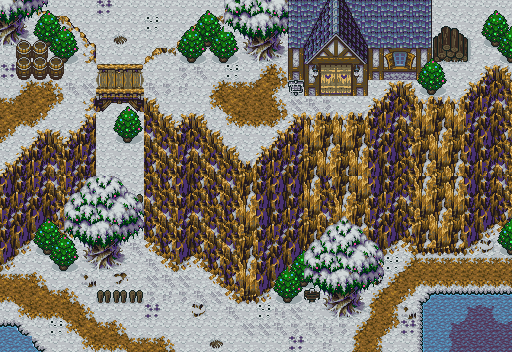
BTW, both trees animate as if they have christmas lights on them. It looks sorta blah freeze-framed, but it looks amazing animated.
Sweet. If you mind, just one little (correction: BIG) suggestion to fix the view of that bridge there: Shadows. I've noticed that it looks like there shadows on the face of the mountains... but then there's none when seeing it on the sides when it ends. Adding shadows to everything (a heck of pain - tis why I have yet to do so in my quest) would probably make everything look at least twice as good. Right now, it looks like that bridge is just on the ground rather than in the air. ... but that is the best bridge I've seen in ZC (so far)...
*Wind notices the doors on the house.*
Lemme guess: Cset6.
Yeah. Just need to make some shadow tiles for the bridge, which really shouldn't be that hard. Also, nothing but the Link tiles use Cset6. I specifically designed the tileset so nothing would touch it other than the Link tiles.
Also:
These are screenshots of the dungeons of my quest, The Eight Spirits:
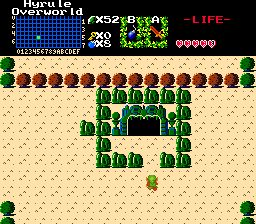
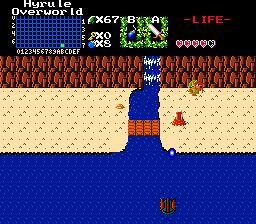
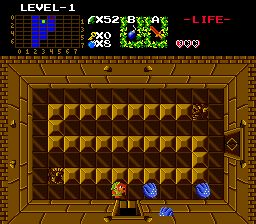
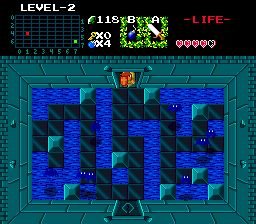
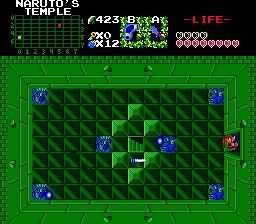
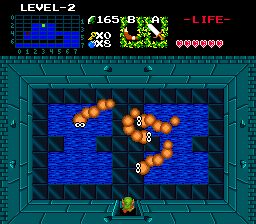
Alrighty guys, I took your suggestions (about the 9 random screenies and the ones about the mountain). The mountain looks much better now with a small stream running from the top to the bottom.
I'm now at the point at which I need a final boss. Instead of taking the "throw in Ganon and call it a day" approach, I decided to make a custom end boss. So, almost embarrassingly, I ripped Mazaal out of Minish Cap, loaded it into ZQuest, and recolored it.

Now, I'm using 2.10, so (as you know) I'm limited to 16 measly colors. I decided to use CSet 5 of Pure, and I got that after an hour of recoloring. What are your honest to honest opinions of it? I'm thinking about using a darker shade of lime for those rings right above its eyes.
I want to be honest, but not rude. I apologize.
Umm.... the light blue for the main color.... it's.... it sucks. Try using a grey, and if you have room (color wise) use a few shades of it, at least 2. Of course black always works too (as its a stone boss). I'll wait for revfan to criticize it.
EDIT: After looking at it a bit more closely, get rid of all the blues and purples and replace them with any combination of these colors(including shades of each):
Grey
Brown
Black
The Greens keep, but use a not-so-bright shade.
that color works, if the dungeon environment around it goes to match it. Otherwise, probably not.
I'll start with Majora.
Don't be sorry for being truthful. I appreciate it greatly. Well, those shades (gray/black/brown) are all too... used and bland. I went with the CSet that had the greatest number of similar colors, which was CSet 5 with all its blues. And you're a nay-sayer to blue bosses?

😉
And now to Wolfie.
Well, the boss battle isn't in a dungeon; it's on top of Level 9. So, outside. That's another reason I went with a lighter color scheme. This is my planned "arena":
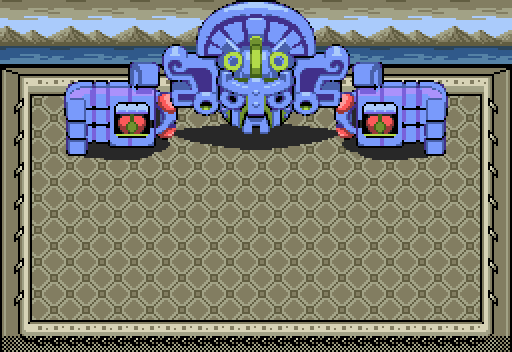
I felt that lighter colors worked better outside. I agree; a darker scheme would work better inside. And, I know, the screen is bland right now.
Whoa. That is just awesome. I mean, that thing gobbles up the whole screen!
It looks quite nice being as it's in an exterior envinronment, but is that going to be the whole boss? Having seen it in two other Zelda games as a contraption made by ancient peacemaking characters to protect things, it doesn't quite look fitting as the final boss. It would be good to have that, but then to have it to transform into one or two other forms when its finished, like one of Vaati's graphics or something
Well, it depends on the plot. Is the final boss the villain, or is the final boss the last guardian to something?
Also, instead of doing all of that recoloring, why didn't you just use a level palette/edit? :P
Ah, Joe123, you figured it out. It is supposed to be Vaati. 😛 I didn't plan on having more than one stage, but perhaps I will. As long as it isn't too hard.
The plot? Heh, you know nothing of the final boss until you face him. So I can basically do whatever I want. Level palette/edit? Say what?
I am forced to use Din's Fire. Absolutely forced. However, how would I go about solving the "black box of doom" problem? For anyone who would try to help me, I'm [stupidly] using the original Pure Tileset. I had to set the Magic Shield Link Tile Modifier to 13768 (the Links are on page 53) and the Mirror Shield Link Tile Modifier to 20008 (the Links are on page 77). But I can't figure out where to place the Link Cast tiles (or where to set the Link Cast sprite in the Link Tiles editor). Naturally, the casting looks fine when Link has the small shield, but I get that black box with either of the other shields. Here is a screenshot of the Links I set for the Magic Shield:
[[Image deleted by poster. No longer needed.]]
Again, the Link tiles for the Mirror Shield are on page 77. Any suggestions?
Try putting it 4 tiles from the edge on the top row - that should do it. You could just set all of the unused tiles on the screen to it though, that should solve it pretty easy 😛
Oh my God.
Full Link Tile Modifiers. Full Link Tile Modifiers. That nasty rule that I had checked. I reverted the Magic Shield's and Mirror Shield's Link Tile Modifiers back to -12 and -6 respectively and unchecked that disgusting rule. And... it was perfect. :sweat:
I do appreciate your help, though. (Even though it did nothing. 😉)
Sorry about the off-topicness. Let the screenshots commence... again.
Well.... I won't argue after this point. But one last thing: I said "No Blue" (although the arena matches it, so it's OK to use the blue) because Gohdan/I forgot his MC name is a stone/earth-ish boss. The manta ray is a Sky Boss so Blue is generic for it. However, the arena matches so I'll shut-up...... for now :tongue:
Right, Mazaal is the guardian of the Earth Element, but is certainly not made of stone:

I've personally never seen shiny yellow earth before. 😉 But thanks again for your suggestions, I've darkened a few spots (like the piercing lime green) of the boss.
Pineconn wrote:Right, Mazaal is the guardian of the Earth Element, but is certainly not made of stone
I've personally never seen shiny yellow earth before. 😉 But thanks again for your suggestions, I've darkened a few spots (like the piercing lime green) of the boss.
To be honest, I think he's made of gold. After all, the wind tribe, the ruins, etc. reminds me of Native Americans, but the Aztecs specifically.
What does he do, crush you with those gigantic Rubik's Cube-looking things or something? Now I'm really scared. NOT! I like Vaati better.
Well, in my quest, he might just shoot 4 combo-wide laser beams from various parts of his body at you, doing either 2 or 4 hearts of damage. Or maybe just push you off the tower, allowing you to burn in the lava at the bottom. 😉