Noone is being paid for it 😉
Post screenshots of your quests here. [1.0]
Hehehe, that's right, the obvious main reason...
"I'm gonna finish this f***ing game quick and get the f***ing money and screw myself over to the f***ing resort island! Hell yeah!"
My quest is practically finished, I just need to ensure it is bugless... and add something that'll be a day's work. But it'll be out before 2008!
Fine. I'll work on it now. There go my plans for playing more Metroid Prime tonight.
relax Pineconn, otherwise therell be loads of bugs in the initial release 😉
Don't rush it, Pineconn. Take your time in smashing the bugs... or people will find them and you still would have to smash em...

Haven't posted screens here in a while. Ripped the Tarm Ruins summer palette.
Any pointers on the screen design though? It's missing something.
Looks fine, although if anything comes to mind, well, it's kinda ....blocky looking. ...Probably those pits and the surrounding grass is what i'm talking about. Maybe some animated pits? ...maybe a pit script: If(Abs (this->X-Link->X)<18 && Abs(this->Y-Link->Y)<18){ // open the pit and tentacles come out!
...yeah, I never liked those pits... 😛
I'll have you know I have scripted the pits Gleeok :waggle:
Not that I've scripted those pit monsters from LA: DX, but with 4 days to go I don't see that happening. They're bottomless, send you back to the start of the screen and deal in some damage to boot.
How'dyu want me to animate them 😕
I can't remember the last time I saw a dancing pit!
Also, I like those tiles personally. Maybe I should make it so they join together rather than being single tiles though?

I think it was the brush, looks better now, no?
I don't see any difference between the two. But it looks great. It really captures the gameboy feel.
Old, New
It's only subtle but it makes all the difference.
Before, I had the brush ending tiles backed up against the mountains. Now I don't. The screen feels more open I think, less blockly like Gleeok said.
Joe123 wrote:
---------------------------------------------------------------!!
Old, New
....you added a pillar. 😮dd:
....oh, I see now. The tileset only has blocky looking grass n' stuff. :laughing:
Pfft, that wasn't what I was showing. The brush edges up against the mountains now ¬_¬
And haven't you played the GB zeldas? 😱
That's what they look like.
Ahh, the GB Zelda gfx... I always wanted to do something with those, as my quest graphics are always the reason I can never get anything done.
Sadly, I can't make screens even somewhat decent looking with them. Ah well...
As for your shots, needs a better palette, IMO.
*expect a screen later, maybe*
I don't see anything wrong with the palette.
Well, it is pretty much directly from OoS.
What don't you like Revfan?
I like Gleeoks screens 😉. I'll post some of mine soon whenever I have the time. Imprisoned's is pretty big too 😃.
[SIZE="7"]POST 500!!!![/SIZE]
The palette seems really washed out. Normally I like low-saturation stuff, but it doesn't look good on lower-quality tiles like Oracles graphics.
Also, I promised, so I delivered. I used my 3 minutes of ZC this month to make this:
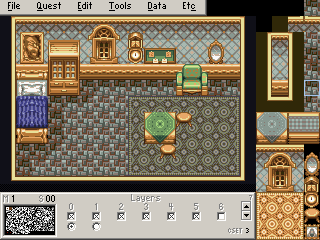
It's VERY incomplete thus far, there are a few other things I have ripped (Most notably, the 5x7 tile Fireplace), but pretty much everything you see there is all that I have for that specific set of interiors. /M/ requested me to rip these interiors a bit ago and I just now got around to starting it.
Might finish it if I get bored enough, but that's unlikely.
This thread sort of died. Allow me to revive it.
I need help with screen design. This screen is very bland looking right now. How could I make it look more interesting? (Just so you know, it is supposed to be the entrance to a castle).

Just put a few bushes here and there.
Umm... Try adding objects? And maybe making the screen not so symmetrical?
Make your moat less straight.
You could also perhaps try adding turrets at the edges of the entrance.
Make sure to block off the bottom corners, probably with trees or something.
Ground Detail.
Nice Transparent water =P
Put some rocks underneath it?
The problem with making the moat less straight is the transparent water in the set isn't complete yet, so I am somewhat limited to what I can do with it. But I'll try your suggestions and see how they work.
ah right.
Well there's nothing to stop you editing it yourself =P
Good Luck 😊
Some shots from LoRII. (These are sorta old, but oh well. I'm still working on this.)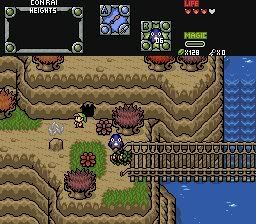
Dood! Everybody run!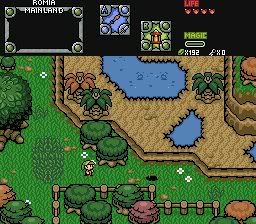
Now how do I get across the hole?
Blaman wrote:Some shots from LoRII. (These are sorta old, but oh well. I'm still working on this.)
Dood! Everybody run!
Now how do I get across the hole?
They look very good. The cliffs are placed very well, so they are not just flat and boring. And I love that big tree in the second shot.
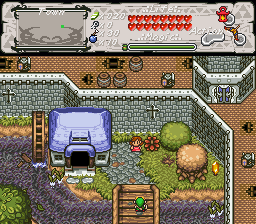
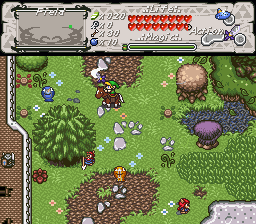
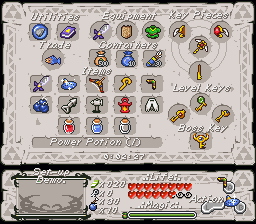
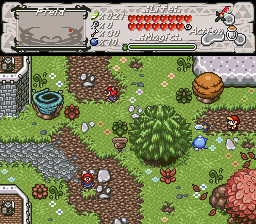
And with that, a new quest is started 😊
A Key to the Heavens, by Joe123 and russadwan.
Nice screens Joe! Hope you guys finish it! So many big projects going around, so little hope for all of them being completed! Let's hope yours is one of them.
DarkFlameWolf wrote:Nice screens Joe! Hope you guys finish it! So many big projects going around, so little hope for all of them being completed! Let's hope yours is one of them.
Yeah, we'll see.
It's a shame it's so hard to stick at things like this, I have a lot of projects that I got bored of and stuff.
I hope so too.
maybe if you put all your discarded projects together, you might actually have a full quest!
Hahaha...
Oh dear =P
If I did that, I'd have half of a really bad Z1 rehash quest made in Pure, half of a reasonable Final Fantasy Adventure spin-off, and about 15 screens worth of a quest not dissimilar to the one I'm making now.
All in all, it wouldn't go well together =P