Of course you did :evil:
Post screenshots of your quests here. [1.0]
there are stuff in the new DoR that I personally HATE... and I won't use em myself... what I can't understand, is that more and more people is using those ugly GB trees... Even though they're edited, they're still to small to match with the tileset.
I still don't see why you hate them so much. Here's what you should have said:
There are stuff in the ne DoR that I personally HATE... and I won't use them myself... what I can't understand, is that more and more people are overusing those giant edited LttP trees... even though they're edited, they can only be used so much to match the tileset.
Or possibly even:
There are stuff in the new DoR that I personally HATE... and I won't use em myself... what I can't understand, is that less and less people are using those beautiful GB trees... Now that they're edited, they're perfectly match the tileset.
you know Russ, I never lie :P
But no, I don't like em... really...
I think mine was better Russ =P
I think we are overreacting about something as silly as 2x2 trees versus 5x4 trees.
Naw I don't think we are, I think the 2x2 trees rock =P
Joe123 wrote:Naw I don't think we are, I think the 2x2 trees rock =P
So do I, but Migo doesn't, and I doubt anybody will be able to change his mind.
Oh I know we're not going to change his mind =P
It's still funny to make up quotes though ^_^
EDIT:
Now that they're edited, they're perfectly match the tileset.
Thanks by the way.
I was going to have a look at the Scent Tree now actually, but I just realised that I have to do a lot of homework if I want to go to my girlfriend's later 😞
Oh Joe, I DO like your edited trees... and I DO like the GB trees... Actually, I love the GB graphics... but let's face it... they don't fit in DoR... DoR is made to look realistic... and... trees that is as small as a big cow really breaks the point...
If you think it's a scale issue then Link is more out of proportion than those trees :shrug:
Gleeok wrote:I won't rest untill all the flowers have been desroyed...well I don't really need to. In light of recent events all available current tilesets are now obsolete and incompatable for what I would like to do.ooh. I almost missed that cool green tree on the left. Nice.
Revfan: Do you use the leech command for ripping 8-bit tiles? What csets do you assign them to? I could use your expertise on the subject.
Of course I use the leech command for ripping tiles, since last I checked, you sortof have to in order to rip them in 8-bit, unless you wanna manually recolor every last tile... *shivers* I also wouldn't call my "Ripping Skills" expertise.
This is really just my own preference, but I prefer the setup of only letting the 8-bit tiles for overworlds and dungeons use sets 2, 3, 4, and 9 (Using the rest of the tiles for sprites). It's a tad harder to set up, but oh, the benefits:
1. Provides MUCH more flexibility with the different colors you can use. If you make your tileset completely 8-bit (Every last tile in the set uses all the Csets), you're sortof stuck with whatever colors you put into those 192 slots. 192 colors sounds like a lot on paper, but once you actually start building tilesets and you want appropriate, good colors for every last tile... Those 192 colors run out very quickly and you'll have to make compromises with your tile quality, which is never a good thing (Unless your complete intention is to retain compatibility, that is).
2. You can make day and night palettes and use those. If you use pure 8-bit, if you want night tiles for an overworld set, you have to make duplicates of everything in the new colors.
The only true-blue downside of only using Csets 2, 3, 4, and 9 for your Overworld/Dungeon sets is that a single set of tiles can only have a maximum of 64 colors at once. But you can really work around that without much consequence if you REALLY want to...
Ah yes. 64 colors per background should be plenty, plus the other csets for sprites. Thank you. This should lead to some interesting screenshots.
Yeah. You can do anything on the scale of the SNES, seeing as the SNES's limit was 64 colors at a time on a single background. With a bit of time and effort, you can get stuff that's absolutely incredible. Case in point:
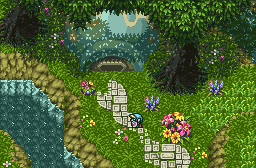
The shot's a little... Ancient. It's from TF, and it's the best example I have of a good 64-color background (It doesn't even use all of those. Cset9 was completely unused as well). I should make some other stuff with the same concept...
Revfan9 wrote:Yeah. You can do anything on the scale of the SNES, seeing as the SNES's limit was 64 colors at a time on a single background. With a bit of time and effort, you can get stuff that's absolutely incredible. Case in point:
Now that's sd3 grass done right. ;P I have to say that's the best looking water i've ever seen. Is that edited?
OK, My first swim into the madness of 8-bit. Man, I wish they made it easier. That was a pain. ...Also I cheezed the layers. The small dots are supposed to be scrolling background and I stuck in too much crap on the top layer. btw- The whole thing scrolls at different speeds. Any thoughts on ways to make it better? I'm thinking; X the large star looking sparkles.
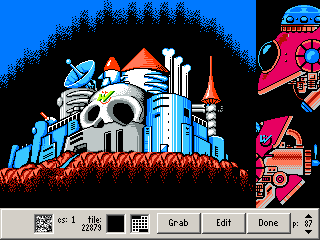
It's not too bad for your first dive into 8-bit colors. Though I must ask, what method did you use? I always used GraphicsGale for my palette and ripping work...
As for the shot, I really hate those stars over the moon. The stars are really ugly and it really distracts from the background's really good details. Not only that, but it's quite unrealistic. If you can see stars right in front of a planet, and you can see the planet very clearly, then those are either some extremely small stars or a really huge planet.
I think it would look best if you just scrapped the top layer altogether.
That aside, the water in that shot is ripped, just like everything else :P
I should still have that sheet of tiles somewhere. Lemme dig for a moment...

There we go. I gave up on the project long ago, so feel free to use any of that you want.
Wow Revfan... I think I'll try and grab some of those...
Anyways, new Hyrule Field palette? I'm not too sure...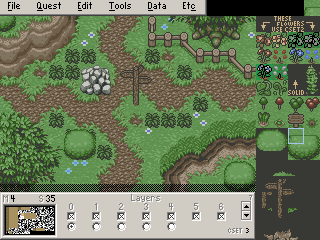
That screen won't be in the quest though... just to test the palette...
It's a bit subtle and washed out for my taste (I've been really liking bright, cheery colors lately). But it does do a fairly nice job of making the grass properly fade into the background instead of standing out like it normally does in the new DoR.
Yeah...the more I look at it, the less I like it... But I want it to have a Twilight Princess feel... I'm not really good at palette making... I'll keep trying then.
Revfan9 wrote:It's not too bad for your first dive into 8-bit colors. Though I must ask, what method did you use? I always used GraphicsGale for my palette and ripping work...
Yeah, I just had a crash course with graphics gale. Stupid that there aren't more shortcuts with it, but I guess 64 colors isn't too much work rearanging the damn pallete colors so it fits inside zc...more like crammed in zc. 😛 ...It works fine though really.
Alright It's fixed. 😊 Just let me say that the screenshot doesn't do it justice. The feel of it is so much better playing the level than what the pics could remotely hope to capture. I couldn't change it at all.
Plus I completely redid the weapon and shield functions for anyone who cares. Now it is a true shield that does all sorts of cool stuff. Anywho. Check it out.

Space fighter to mission control, space fighter to mission control...the monkey keeps drinking his own urine, over.
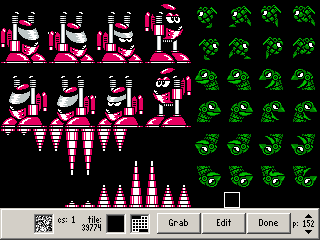
Pew! Pew! Pew! 😛
hehe.
migokalle wrote:Yeah...the more I look at it, the less I like it... But I want it to have a Twilight Princess feel... I'm not really good at palette making... I'll keep trying then.
Well out of a bit of boredom, maybe a bit of a compromise?
Old:
New: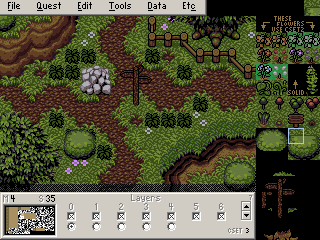
May not be exactly what you wanted... But I like it myself. It's darker and more solemn (Which seems to be what you were going for) without looking like it was bleached. Some of the tiles in the "New" image look messed up simply due to how different types of greens are used for the trees and grass, which looks a hell of a lot better than forcing the Tree and Grass colors to be the same. But it screws around with some of the tiles when you do that since Raiden likes to use the grass colors on the trees and crap.
Hmm.. thanks! I'll see whatI can do with it! Thanks again!
Revfan9 wrote:
I should still have that sheet of tiles somewhere. Lemme dig for a moment...
There we go. I gave up on the project long ago, so feel free to use any of that you want.
I am definitly using some of those tiles in my quest.
migokalle wrote:Wow Revfan... I think I'll try and grab some of those...
Anyways, new Hyrule Field palette? I'm not too sure...
That screen won't be in the quest though... just to test the palette...
It needs to be brighter. That one looks to dark, as if it were in a small forest.
/me randomly appears and posts here.
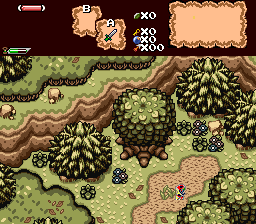
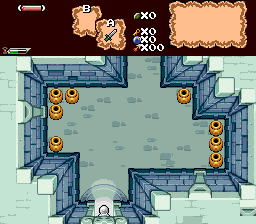
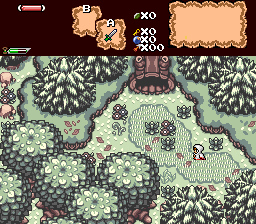
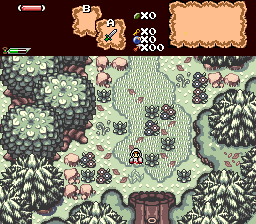
The link sprites will be changed, I am just waiting for new ones.
Hey Evile.
We seem to have been getting quite a few Pure members posting here over the past few days.
Yeah, me and Plissken were talking about this place ad I decided to come post here.
Ah, fair enough.
Hope you have fun and all that.
Evan the Great wrote:/me randomly appears and posts here.
The link sprites will be changed, I am just waiting for new ones.
Now where have I seen that stuff before...
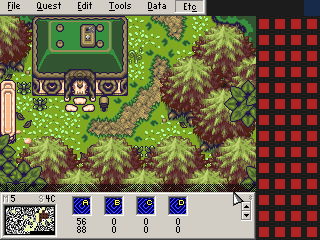
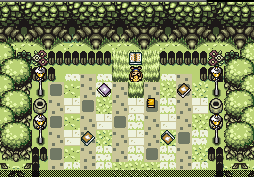
...Nope. Doesn't ring a bell...
I was granted permission from both Relic and /M/ to use all of those tiles. And all of my palettes are custom by me.
And blech, /M/'s old palettes were terrible, he has way better ones posted at PureZC.
So I'm not allowed to mess with you? ;-;
Revfan9 wrote:So I'm not allowed to mess with you? ;-;
I think you got pwned =P