Read-only archive of the Armageddon Games Forums Archive (2000–2026) · About this archive

Large Mode: the official topic

73 replies · 22,979 views · Started 15 December 2008

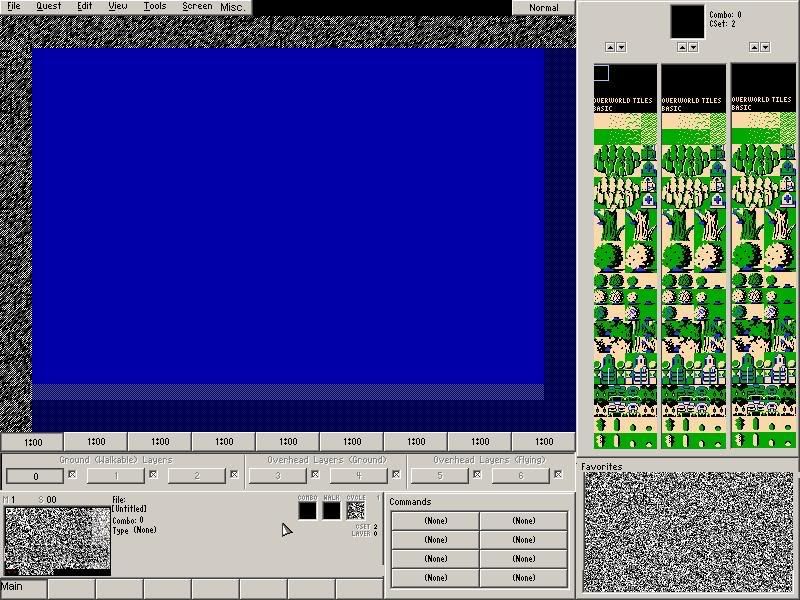
Large Mode is the new interface for ZQuest. It looks like this: http://img291.imageshack.us/img291/3259/zelda002kd3.gif

It features the following primary attributes, in order of importance:

* Main Screen
The main screen is twice as large as in Small Mode, and includes a Screen Edge Preview showing the adjoining rows and columns of the adjacent screens.

* Screen Tabs
You can have 9 screens 'open' simultaneously. The tabs display the screen number of the screen that they are set to.

Current disadvantage: don't look tab-shaped.

* Layers Bar
It should always be possible to instantly tell how many layers a particular screen has, and which layer you are currently working on. To that end, this Layers Bar exists. Layers are grouped by type, and the visibility of each can be toggled with a checkbox. The screen number of the screen for that layer is displayed on the button.

* Combo Selectors
Three selectors allow you to select combos from three different places in the combo list simultaneously. The currently selected combo is displayed atop. Also present: buttons that advance the lists of combos, in a manner similar to Shift-Page Up and Shift-Page Down.

Current disadvantage: apparantly people find three selectors intimidating?

* Main Panel
Previously the only panel in Small Mode. It houses the important Minimap, which lets users choose a screen from the current Map to work on.
The Main Panel contains the following pages of options, which can be selected with the row of buttons beneath:
* Main. Displays the selected combo's number, type, tile, walkability, and cycle. Also, the name of the currently open quest file.
* Flags. The only way to place the Item location square, as well as the 'legacy squares', which are the Green Square and the Stair Square. And, there's a square that lets you place more of the most recently selected Combo Flag.
* Screen Flags. Shows some of the current screen flag settings for this screen, as well as the Enemy Flags and the Enemy Pattern. Current disadvantage: not very useful at all. Likely to be cut?
* Room Type. Displays the current Guy, String, Room Type, and Catch All value (which will usually be the Special Item).
* Tile Warp. Displays some of the settings for Tile Warp A and Side Warp A. Current disadvantage: no room for warps B, C and D.
* Maze Path. Shows the Maze Path settings. That's it. Likely to be cut?
* Nothing. Since Layers are now controlled by the Layers Bar, this button will be removed.
* Warp Returns. The only way to place the Warp Return squares. The most important panel?
* Preview. In Preview Mode, the panel displays the key commands for Preview Mode.

* Commands
Select a command that you use often, so that you don't have to use the menu bar all the time. Personal recommendations: Tiles, Combos and Compile ZScript.

Current disadvantage: takes up a bit of space. Could it be a dropdown menu?

* Favorites
Place your most commonly-used combos in this panel. Current disadvantage: do we really need that many spaces?

So, let's discuss ways to improve this interface. Some starting questions:

1) Should the Main Panel be larger? Should Commands be integrated into it? Should the Minimap take up more of the screen? Should we replace the icon buttons with text buttons? Which panels should be cut? Can we put the most useful functions into a single panel?

2) Should the Screen Tabs be moved somewhere else? Above the screen, or below the Layers Bar?

3) Do Commands and Favorites take up too much space? Are the Combo Selectors a bit too tall? Are the combos themselves too small? Could we do fine with just two Combo Selectors or even one?
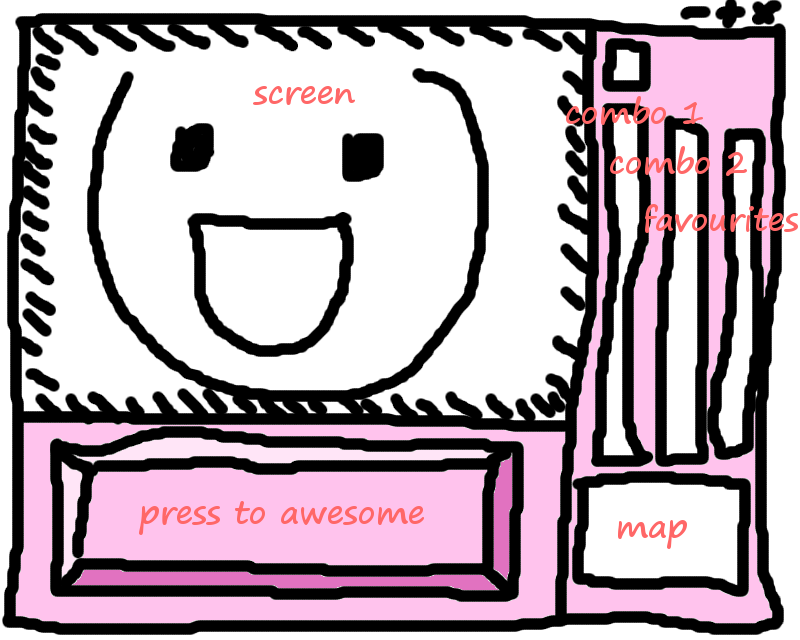
My Opinions:

1) The Minimap could stand to be a bit larger. Some people are a tad blind, and can't really spot a 3x3 pixel block that well. Perhaps shrink the panel buttons in the lower left corner into a 4x2 space below the panel they represent, and enlarge the minimap? Once someone learns pageup and pagedown, they don't use those buttons much anymore, really.

2) Would it be possible to "enlarge" the Tiles Pages so they're not as hard to see anymore? Essentially, it'd mean having two modes for it: Enlarged, and Screenshot-Compatible. Hell, hitting the "screenshot compatible" button would really just take a screenshot, and halve the size of the image to emulate compatibility before reduction even takes place, as it's already taken the screenshot as the proper size with no visible difference to the screenshot taker.

3) Commands are Favorites are perfectly fine, -if- they're nothing else to take their place. If someday we discover another possibility, I can imagine us alternating between the Commands and Favorites area, and some other thing that'd fit into the same space.

- try removing the thick borders around things, things like the "command" buttons are pretty huge, dividers between the 3 combo selectors on the right is pretty wide, the menu bar itself can be shorter in height, etc.

- increase the size of the minimap :P

- change/remove the icons for the buttons under the minimap.

- have support for pinned dialog boxes 😉

- as a matter of personal preference, I preferred the old skool font that used to be used in all the dialogs before they were "enlarged" :/

- move the "screen tabs" above the main screen, but under the "menu bar"

Here's what I think about it. It's a nice interface, but it's too big. I'm used to windowed mode standard editor. And then comes large mode. For people used to small mode, it's too big. For people new to ZC, it's too confusing.

Maybe put the minimap in place of the favourites box, so it's bigger. And replace the third combo section with a favourites section. ???

Eh, it's the window itself - that's the problem. Everything's crammed into one window, and you can't change/move things around, or remove and add other stuff; It's just not customizable at all.

Here's a few things that should be in a separate window:

  • Combo List. One per window is enough; let the user decide how many lists he or she wants to have at a time. Also, take the search and other abilities from the Combo Editor, and include them into that window.
  • Tabbed lists. Organization is key - Resources aren't really marked properly as of right now. With this master list, different resources such as items, weapons, tile pages, combos, and sound effects are separated to different directories and files.
  • DMap List. Not do you just have the Dmap name and type in an easy and accessible list form, you also have each screen listed, and their warps marked to where they go, and the items that are there. An advanced view could also keep track of combo IDs and various flags.
  • Item Tracker. Heart Container Pieces, rupees, and quest-specific items are tallied here, along with location and conditions.
  • Minimap, nothing else to say about that.
That's all I can say.

EDIT: Thought of something else - a Comment section. Screens and Dmaps are what it's for, to make notes about the screen. For example, an unset warp because the destination screen wasn't made yet. Also, include a notepad, letting people write down things that are specific to that quest.

Suggestions are good. Keep them coming. But it's a lot easier to see what someone is talking about if they create a mockup for their vision.

What Linkus was saying gives me an idea. Make it fully customizable.

For example, let's say that rather than have a favorites menu at the bottom right of the screen, I want it to be commands. So I click ETC-Customize. I click on the favorites, and choose something else (in this case commands, but it could be anything). And then it rearanges them to put the thing I asked for there. Or if I wanted the far right combo list to be combo alliases, I coulkd do the same thing, click on the third combo list, and choose combo alliases to have them be out there.

russadwan wrote:Here's what I think about it. It's a nice interface, but it's too big. I'm used to windowed mode standard editor. And then comes large mode. For people used to small mode, it's too big. For people new to ZC, it's too confusing.

How do you know? You're not new to ZC. And, very few people who are new to ZC use the betas (or, at least, talk about them).

The thing about small mode is that it was great -- up until it switched to the Windows-style GUI. Then, it became awkward. From something that looks like Windows, I expect certain Windows-like behaviour. Dragging the title bar of a sub window should move the window (this should be addressed in large mode too), etc. Under DOS, we didn't have these assumptions.

Linkus wrote:Eh, it's the window itself - that's the problem. Everything's crammed into one window, and you can't change/move things around, or remove and add other stuff; It's just not customizable at all.

Here's a few things that should be in a separate window:

  • Combo List. One per window is enough; let the user decide how many lists he or she wants to have at a time. Also, take the search and other abilities from the Combo Editor, and include them into that window.
  • Tabbed lists. Organization is key - Resources aren't really marked properly as of right now. With this master list, different resources such as items, weapons, tile pages, combos, and sound effects are separated to different directories and files.
  • DMap List. Not do you just have the Dmap name and type in an easy and accessible list form, you also have each screen listed, and their warps marked to where they go, and the items that are there. An advanced view could also keep track of combo IDs and various flags.
  • Item Tracker. Heart Container Pieces, rupees, and quest-specific items are tallied here, along with location and conditions.
  • Minimap, nothing else to say about that.
That's all I can say.

EDIT: Thought of something else - a Comment section. Screens and Dmaps are what it's for, to make notes about the screen. For example, an unset warp because the destination screen wasn't made yet. Also, include a notepad, letting people write down things that are specific to that quest.

Much of that stuff I do using an external document, as it is both easier and more flexible.

My biggest suggestion would be to augment the Favourites panel. Maybe have it so that you can toggle it between the Favourites and the Mini Map (since, it's unlikely you'll need both at the same time).

Or, if you want to go hog-crazy, add a multi-window dialog system, if that's at all possible in Allegro! Float the Mini map, Favourites and even the command bar!

Silly stuff:
I'm not complaining too much about large mode... other then it being too small. (Really I could fit 4 windowed large modes on my display without an overlap)

Seriously:
I can understand some of the complaints. Combining The favorites and command panel into one does make sense. Its rare to need to switch between them so often that is too much trouble. A nice big mini map seems like it would be essential in the next version, considering some of the features y'all have slated in the distant future.
I more or less concur with mighty darknut's diagram. And Screen notes are a great idea for one of the main panel features.

Do realize that we can rewrite the underlying ZQ GUI structure to accomadate more flexible functionality if it's wanted, just know that any attempts to do so would only lead to more development time and inevitably more bugs. 2.5 is overdue as-is, so try to keep your suggestions realistic. We'll have plenty of time for complete structure rewrites once 2.5 is out the door.

Five simple, quick changes:
-Expand the menu bar.
-Page icons to text (thereby shorter, giving more room for the menu bar)
-Move the map tabs to above the map. (open to discussion)
-The tab key (and shift+tab too) should cycle through the layers.
-Shrink the favorites panel and expand the commands panel. You don't need that many favorites and it'd be nice to have more commands. Maybe even push up the favs a bit and push the commands over.

Dark Nation wrote:Suggestions are good. Keep them coming. But it's a lot easier to see what someone is talking about if they create a mockup for their vision.

BAM!

So, lemme explain this. It is kinda crappy, but it gets the point across.

[LIST=1]
[*]Move lower menu bar for larger map.
[*]Smaller "Command" bar for moved window tabs.
[*]"Jump to_" is something I'd love to see. It is kind of like a "bookmark". You register a combo, and can jump to it on the combo list. This would be great for getting from 'dungeon' to 'floor border' without gratuitous amounts of scrolling etc. I hope that makes sense. I doubt it would be too hard to implement. It could use a modded favorite code?
[*]Display Settings? This is for the kind of stuff Linkus mentioned. It would probably require a lot of work, but customizing windows, and such would be awesome, and eliminate everything else I said >.>
[*]An option to remove/ extend certain things. I'd like to remove the screen borders sometimes. It can get confusing.
[*] EDIT: A 'true' mini-map?
[/LIST]

If you simply increased the reolution of Large mode, you can have a much improved version of the current layout without it looking so clunky :/ and you can even fit a larger minimap in 😃

User posted image

Minor changes, just resized some borders, the minimap, main buttons and renamed the Etc. menu option... I would do more but the image provided uses layers or something and fucks up in mspaint when ever I try moving something :/ had to redraw the writing next to the minimap after moving it across, hell I couldn't move the text that far across because it gets covered by some gray on a higher layer or something fucked o_O

Provide a single layer image of the ZQUEST GUI and I'll make a better mockup.

Tobias_Daboi wrote:
[*]"Jump to_" is something I'd love to see. It is kind of like a "bookmark". You register a combo, and can jump to it on the combo list. This would be great for getting from 'dungeon' to 'floor border' without gratuitous amounts of scrolling etc. I hope that makes sense. I doubt it would be too hard to implement. It could use a modded favorite code?

But I already added this in build 809!
* Now, right-clicking on a combo in the Favorites palette gives you the menu option of scrolling to the combo instead of just editing it. [SIZE="2"]( _L_, 2008-06-04 07:50:14 )[/SIZE]

Okay, since I really really really really want 2.5 to finish soon because I am pulling out my hair; I will offer some Shoelace suggestions! Dun Dun Dun!

* Screen Tabs
Screen tabs are great. No problem with that.

* Layers Bar
Layer's Bar is cool. One thing though is: wouldn't it be cool to automatically be taken to the layer screen you want to edit? Say for example, the layer 2, you want to edit it. So you click on Layer 2 go to, and it goes to that screen. Since there isn't that much room, I say a hot key could be good for that. For example, if you right click it goes, or maybe if you click while holding the ctrl. Just a thought. Just saying. If not, whatever.

* Combo Selectors
The main problem with this is that everything is SO SMALL. Seriously, when I am trying to make something like for example a certain combo cycle, the tiles look alike, so I don't know what I am clicking on because it is SO SMALL. Sometimes, there is a small detail on the tile that I have to go face to face with the screen just to see.

Solution: Make it two instead of three!!!! Or better yet: Have an option on the side of the current tile, that says: 1, 2, or 3. When it is clicked on 1. It only shows one! And if you really want on the top there can be left and right arrows to toggle through the combo selectors. When clicked 2, it shows 2. When clicked 3, it shows as displayed. I think this would be way better and we satisfy everyone. 😉

* Main Panel
It is just two small. Especially for the all important mini map. Those toggle buttons on the bottom, need to be smaller. And then this needs to be stretched or at least redesigned for the mini map. My Solution is explained in the next part:

* Commands/Favorites
My suggestion is for both of them. The Main panel uses a toggle system to go through things. Why not use the same thing for the Commands and Favorites. Have an arrow button or tab that makes it toggle through the two: Commands and Favorites. It is still really easy to do and it saves A LOT of Room. They are pretty much the same size and it is in a perfect place, the lower right. Plus, the Main Panel can now be stretched to fit the bottom and be a lot bigger. <3

*Also
OMG, PLEASE extend the tile pages.... It is just impossible to edit things. That is my biggest hurdle with Large Mode. The Tile Page, and the Combo Pages are just UNBELIEVABLY SMALL. I just can't work with it. I tried and I can't. So that is why I am still in small mode. But once you fix that, I will move. But OMG, it is so small. >_<

That is all. XD

the current map and screen information is shown directly above the minimap, maybe move it to the right of the minimap but placed vertically, so like this,
MAP
SCREEN
to allow even further resizing of the minimap?

I agree with Shoelace, the tile editor is so hard to work with. Why can't it be a little bigger?

THe tile editor, along with the combo editor and subscreen editor, will be increased in size by the time 2.5 is released, don't worry.

Good. I'm an old guy and the tiles are very hard to see.

Perhaps increasing the font of things like the map number on the main page and in the sub menu when you right click on a combo?

I know it's called large mode, but to me there is really nothing large about it.😊

I'm gonna have to agree with the toggle button for the commands/favorites.
I stand by all my other suggestions stated earlier.

franpa wrote:Provide a single layer image of the ZQUEST GUI and I'll make a better mockup.

Hmm. It copied fine for me into MS paint :/ I have Windows 2000.

_L_ wrote:But I already added this in build 809!

*Ecstatic reaction* So, how do you do it?

mighty_darknut wrote:I have a question that I may as well ask here; How do you remove a combo from favourites? >.<

Erm.. Dumb question: How do you add them to favorites 😃 ?

jman2050 wrote:THe tile editor, along with the combo editor and subscreen editor, will be increased in size by the time 2.5 is released, don't worry.

...and the Palette editor as well!