Read-only archive of the Armageddon Games Forums Archive (2000–2026) · About this archive

Links look at the start screen

38 replies · 62,202 views · Started 22 November 2018

How is it possible to change Links look at the start screen?

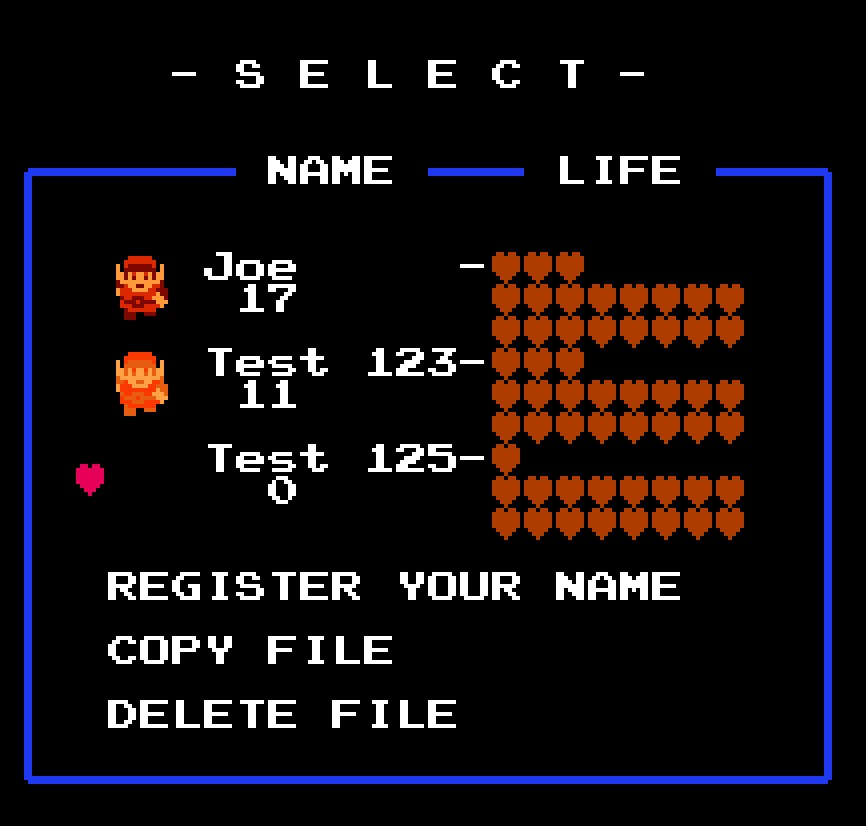
User posted image

Slot 1 = Red ring and something else
Slot 2 = Red ring and something else
Slot 3 = Golden ring

Why slot 1 and 2 has a different look?

And why the golden-ring-Link is black/invisible?

How can I change it?

Joeiiii wrote:How is it possible to change Links look at the start screen?

User posted image

Slot 1 = Red ring and something else
Slot 2 = Red ring and something else
Slot 3 = Golden ring

Why slot 1 and 2 has a different look?

And why the golden-ring-Link is black/invisible?

How can I change it?

In the ZQuest Editor, use Quest->Graphics->Game Icons. The graphic (tile) is linked to the highest level of (Armour) Ring that Link has; and the tile bust be 4-bi (16-colour).

Note that the internal 1st->5TH quests use hardcoded tile IDs for their icons. That behaviour is likely to change in 2.55, as the quest icons should be set by the current module.

ZoriaRPG wrote:In the ZQuest Editor, use Quest->Graphics->Game Icons. The graphic (tile) is linked to the highest level of (Armour) Ring that Link has; and the tile bust be 4-bi (16-colour).

Note that the internal 1st->5TH quests use hardcoded tile IDs for their icons. That behaviour is likely to change in 2.55, as the quest icons should be set by the current module.

Could someone please kill this thread? It is the same one. 😞

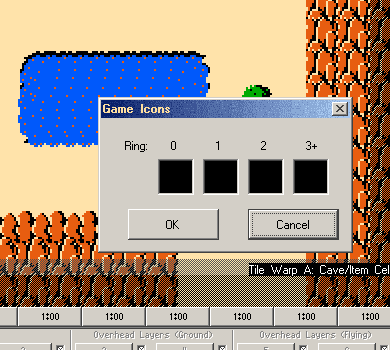
There are 4 black squares.

User posted image

0 = no ring
1 = blue ring
2 = red ring
3 = golden ring

Correct?

I don't know what I have to do. The squares stay black, whatever I do. 😞

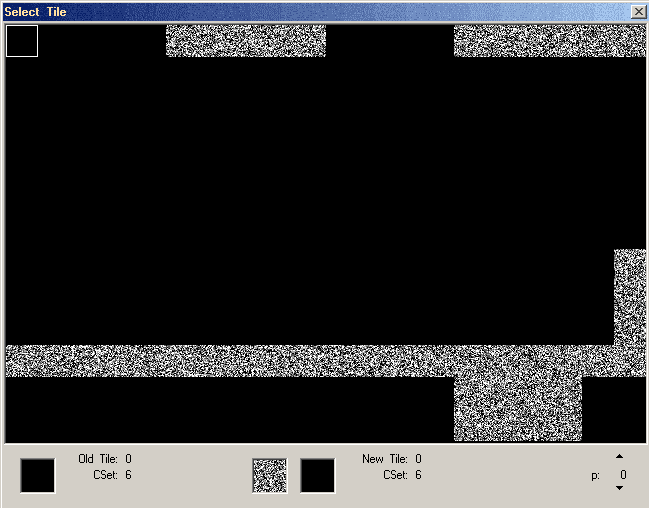
If I click to one of the squares:

User posted image

I can change the CSet, so that I see tiles, but what then? I can't select a tile and the square stay black. 😞

Joeiiii wrote:Could someone please kill this thread? It is the same one. 😞

There are 4 black squares.

User posted image

0 = no ring
1 = blue ring
2 = red ring
3 = golden ring

Correct?

I don't know what I have to do. The squares stay black, whatever I do. 😞

If I click to one of the squares:

User posted image

I can change the CSet, so that I see tiles, but what then? I can't select a tile and the square stay black. 😞

I'd guess that your palette has black for its CSet 6 colours. IDK how you set that up, but I'd think that your Lv3 ring CSet offset is wrong.

In the Item Editor, this is the Link Sprite Palette attribute on armour ring class items.

Post a link to download the quest file that you are editing, and I'll have a look.

Joeiiii wrote:https://www.file-upload.net/download-13415297/v127.qst.html

Thank you for your help. :thumbsup:

Oh my... Where did you find this base quest file? The tileset is from ZC <= 1.90 .... ?!

I can't promise that it won't have any other serious defects, but I patched in the current palette and tiles, and I fixed the quest icons for you.

http://timelord.insomnia247.nl/zc-dev/quests/2.53/v127-fixed.qst

Unfortunately, it won't be set up for any of the new tiles, and splicing in the current combo table isn't an option. It'd probably be better to re-create your maps using the current base files, to avoid issues, but at least this will remedy your immediate concern. You just won't have any of the new graphics that have been added to the base ZC tileset over the last seventeen years. 😉

P.S. You may want to rethink the Magic-Octorock spam on the overworld, too. Other than that, it looks to be a fun little dungeon romp, en Deutsche. 😃

ZoriaRPG wrote:Oh my... Where did you find this base quest file? The tileset is from ZC 1.00 .... ?!

No, not ZC 1.00, but 1.84 or 1.90. 😞

I started building my quest many years ago, then I did nothing for a long time and just recently started again.

Joeiiii wrote:No, not ZC 1.00, but 1.84 or 1.90. 😞

I started building my quest many years ago, then I did nothing for a long time and just recently started again.

I corrected my post. 1.00 was a typo for 1.90. 😉

You managed to read my reply in the minute or two between posting it, and correcting+amending it.

(It's impossible to open quest files older than 1.84 in ZQuest versions >= 1.84.)

I posted a fix, and more details at the same time. If you send the older file, prior to saving in 2.50.2, to me, then I could precisely detail the version of ZC in which it was previously saved.

ZoriaRPG wrote:Unfortunately, it won't be set up for any of the new tiles, and splicing in the current combo table isn't an option. It'd probably be better to re-create your maps using the current base files, to avoid issues, but at least this will remedy your immediate concern. You just won't have any of the new graphics that have been added to the base |C tileset over the last seventeen years. 😉

Isn't it possible to convert it in any way? 😞 I've tryed to export my maps, dmaps, etc. and import it in a new file, but it doesn't work.

Animated water and many other things would be grate.

ZoriaRPG wrote:P.S. You may want to rethink the Magic-Octorock spam on the overworld, too. Other than that, it looks to be a fun little dungeon romp, en Deutsche. 😃

Magic-Octorock Spam? This is the Magic-Octorock reduced version!:P Ok, the corner you address is the one that is dangerous. Ganons palace is there. The king of the underworld rams his henchmen around. Maybe a problem without the mirror shield, a boomerang and the red ring, but this is The Legend of Zelda and NOT a little girls birthday party. In the non-Ganon-area are almost no Magic-Octorocks, except to guard the magic sword and the master sword/golden arrow.

But apart from that: Thank you for your help. :thumbsup:

PS:

ZoriaRPG wrote:... en Deutsche. 😃

Your German (or your Google translation) is just as bad as my English. :P

The colors used for select screen icons are not the same ones used for Link in-game. In Quest > Graphics > Palettes > Sprites > 1, CSets 9-12 are the ones used on the select screen.

You can press C and V to copy and paste CSets. You can even copy them from the main palette to the extra palettes that way.

Joeiiii wrote:Isn't it possible to convert it in any way? 😞 I've tryed to export my maps, dmaps, etc. and import it in a new file, but it doesn't work.

Animated water and many other things would be grate.

Magic-Octorock Spam? This is the Magic-Octorock reduced version!:P Ok, the corner you address is the one that is dangerous. Ganons palace is there. The king of the underworld rams his henchmen around. Maybe a problem without the mirror shield, a boomerang and the red ring, but this is The Legend of Zelda and NOT a little girls birthday party. In the non-Ganon-area are almost no Magic-Octorocks, except to guard the magic sword and the master sword/golden arrow.

But apart from that: Thank you for your help. :thumbsup:

PS:

Your German (or your Google translation) is just as bad as my English. :P

You can add combos after a specifc position. I just couldn't automatically replace all of your combo table, as the flip values differ from 1.90->2.10 (and above).

http://timelord.insomnia247.nl/zc-dev/2.55/modules/classic/1st.cmb

Download that, then:

1. Determine the lowest used combo (with no combos after it!!) in your combo table, and make a note of its ID.
2. Go to Quest->Import->Combos
3. Set the starting point at the value that you noted in (1)
4. Select the file 1st.cmb in the dialogue.
5. ZQuest should append the new combos to your combo table, and because I pre-loaded the tileset and the palettes, they should instantly work, and be available.

P.S. My German is somewhat degraded, and I primarily read the language infrequently, but en Deutsche is slang (phonetic 'en'😉 of sorts, over here. (Probably a remnant of WWII era slang.)

Saffith wrote:The colors used for select screen icons are not the same ones used for Link in-game. In Quest > Graphics > Palettes > Sprites > 1, CSets 9-12 are the ones used on the select screen.

You can press C and V to copy and paste CSets. You can even copy them from the main palette to the extra palettes that way.

Coincidentally, I added Link's tile on the file select screen to the modules yesterday: Coincidentally, because James needed it for the Demo Series modules., and it has been on my list for a while. I probably would have delayed it a bit, but the name entry screen graphics were garbled in his module, because the base tile placement is offset from 2.50 specs, using the old 1.84-era format!

I need to do some further refinement, so that the tile works without interfering with custom quest icons, and some other things. The behaviour on the name entry screen is a bit quirky.

Anyway, I mentioned this because I have yet to add a modifier to the the cset value, when the module has a manual tile override. At present, the tiles default to csset 9--where the sprite palette data loads, IIRC--but the module can use any cset that it wishes.

I'll need to add some way to read Link's modified colour to the new routine, with an option in the module to suppress that.

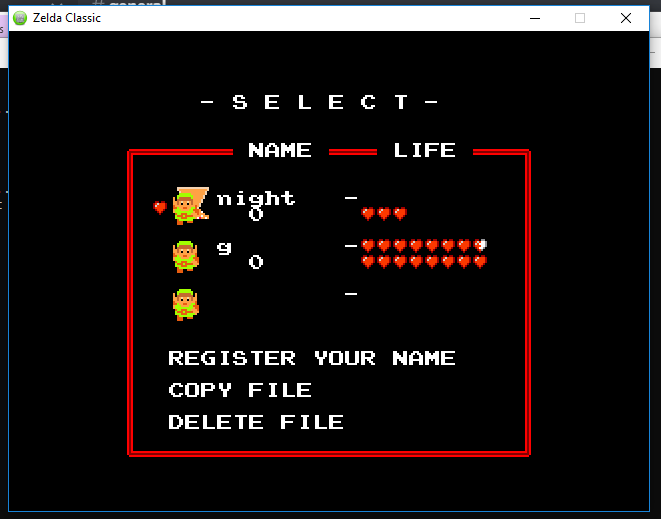
Even so, here's the current module-driven name entry screen:
User posted image

You can set the frame tile and cset, Link's tile and cset, the cursor tile and cset, and up to two decoration tiles (and csets each), for up to ten (internal) quests in the nodule package.
ZoriaRPG wrote:http://timelord.insomnia247.nl/zc-dev/2.55/modules/classic/1st.cmb

Download that, then:

1. Determine the lowest used combo (with no combos after it!!) in your combo table, and make a note of its ID.
2. Go to Quest->Import->Combos
3. Set the starting point at the value that you noted in (1)
4. Select the file 1st.cmb in the dialogue.
5. ZQuest should append the new combos to your combo table, and because I pre-loaded the tileset and the palettes, they should instantly work, and be available.


It doesn't work. 😞

1. The lowest used combo is 192.

2. ????? Are you sure that you mean Quest->Import->Combos? I can't import there anything. You mean File->Import->Combo Table??

3. OK

4. OK

5. Maybe I'm too stupid for that. 😞

You have my qst.-file. Could you please try it?

ZoriaRPG wrote:P.S. My German is somewhat degraded, and I primarily read the language infrequently, but en Deutsche is slang (phonetic 'en'😉 of sorts, over here.

Maybe it is a german slang IN GERMANY, but I am from Austria (Salzburg, on the german/bavarian border). This is the land with the mountains, not with the kangaroos. :P In Austria we have the problem that a West Austrian hardly understands an East Austrian when he speaks in dialect. And vice versa. Damned dialects. The most often spoken sentence: What did you say? :spin:

PS: Your tutorial doesn't work, but at least I have since yesterday an animated waterfall.

Joeiiii wrote:It doesn't work. 😞

1. The lowest used combo is 192.

2. ????? Are you sure that you mean Quest->Import->Combos? I can't import there anything. You mean File->Import->Combo Table??

3. OK

4. OK

5. Maybe I'm too stupid for that. 😞

You have my qst.-file. Could you please try it?

Maybe it is a german slang IN GERMANY, but I am from Austria (Salzburg, on the german/bavarian border). This is the land with the mountains, not with the kangaroos. :P In Austria we have the problem that a West Austrian hardly understands an East Austrian when he speaks in dialect. And vice versa. Damned dialects. The most often spoken sentence: What did you say? :spin:

PS: Your tutorial doesn't work, but at least I have since yesterday an animated waterfall.

Oh, rats. I'll have a look, but I may have remembered the behaviour here wrongly. You need to insert blank combos first, to create the offset, and the starting value is the combo page, not combo ID.

EDIT: There's sadly no way to automate this. I'd need to do a lot of manual reconstruction, using your ma;d in the newer tileset.

If I have time, I'll try to do that, but even basic things such as dungeon doors--hardcoded tiles in 1.90--now need combos. I'd need to do massive amounts of reconstruction.

I can possibly wotk on features for ZQuest, tp insert raw combos or tiles, but that's another matter.

ZoriaRPG wrote:Oh my... Where did you find this base quest file? The tileset is from ZC <= 1.90 .... ?!

I can't promise that it won't have any other serious defects, but I patched in the current palette and tiles, and I fixed the quest icons for you.

http://timelord.insomnia247.nl/zc-dev/quests/2.53/v127-fixed.qst

Unfortunately, it won't be set up for any of the new tiles, and splicing in the current combo table isn't an option. It'd probably be better to re-create your maps using the current base files, to avoid issues, but at least this will remedy your immediate concern. You just won't have any of the new graphics that have been added to the base ZC tileset over the last seventeen years. 😉

P.S. You may want to rethink the Magic-Octorock spam on the overworld, too. Other than that, it looks to be a fun little dungeon romp, en Deutsche. 😃

how can I earn money to buy things without the sword, etc.?

BurgerKingCenturion wrote:how can I earn money to buy things without the sword, etc.?

Without a sword you have a very big problem. Different from the original quest, aka 1.qst, you can't find money without bombing a rock or burning a tree. The other "problem": Without a sword you can't win the fight. We all know: You can't kill Ganon without a sword. But this is not your biggest problem, because without a sword you will never reach Ganon's room. 😞

BurgerKingCenturion wrote:where can I find the English speaking version

At the moment nowhere. If you are really interested, I can translate the strings. That was planned for the final version anyway. :P

Joeiiii wrote:Without a sword you have a very big problem. Different from the original quest, aka 1.qst, you can't find money without bombing a rock or burning a tree. The other "problem": Without a sword you can't win the fight. We all know: You can't kill Ganon without a sword. But this is not your biggest problem, because without a sword you will never reach Ganon's room. 😞

At the moment nowhere. If you are really interested, I can translate the strings. That was planned for the final version anyway. :P

He wants to know where to find the first sword. 😉

This is related to the quest icons not appearing/possibly crashing things if unlocky Zoria.

Also for 1.84 and below, it can be impossible to display them at times. I need to check if that's been fixed.

Thanks for detailing it Joeiiii

-James