DarkDragon wrote:I didn't change any DirectDraw libraries (I don't think that this is a good idea; the only alternative set I tried caused problems with the sound playback). I did patch Allegro to hopefully not crash DD anymore, though. Those fixes are included in the precompiled allegro lib and dlls.Including winflex.exe and winbison.exe is not entirely unreasonable, though I'll have to check the licenses and make sure this is OK.
I have no idea why link.exe is crashing 😞 it's worrying, but if it's producing working binaries....
Here are the binaries that it produced: http://timelord.insomnia247.nl/zc/zc_dev/ZC_2.50.3_Allegro44.zip
You might want to inspect them for any kind of corruption caused by the linker crashing. I don't know why it is happening.
I'm going to try to get a few users to test this build.
I'm seeing some framerate loss. I presume that is because of the debug flag on this, and that it is writing to the debug files during operation?
There is also some kind of bitmap corruption happening when setting ullscreen. THe imnitial time it is set, nothing seems wrong, but wexiting fullscreen to windowed mode, and returning, there is.
To replicate this:
Launch zelda.exe
Start playing 1st.qst
Change from windowed mode to fullscreen
Change from fullscreen to large window
Change back to fullscreen
The black borders become pink, drawn as colour 0 rendered visible, and windows gadgets will flicker through them. Perhaps the system palette isn't being set properly somehow.
Further, the mouse cursor is not visible when ZC first opens, and lacks a save file. Clicking OK/Cancel is rather hard to do without that.
Oh my. Starting in fullscreen, the colour table is corrupted. Invisible colours are rendered as pink, and there are numerous other colour artefacts.
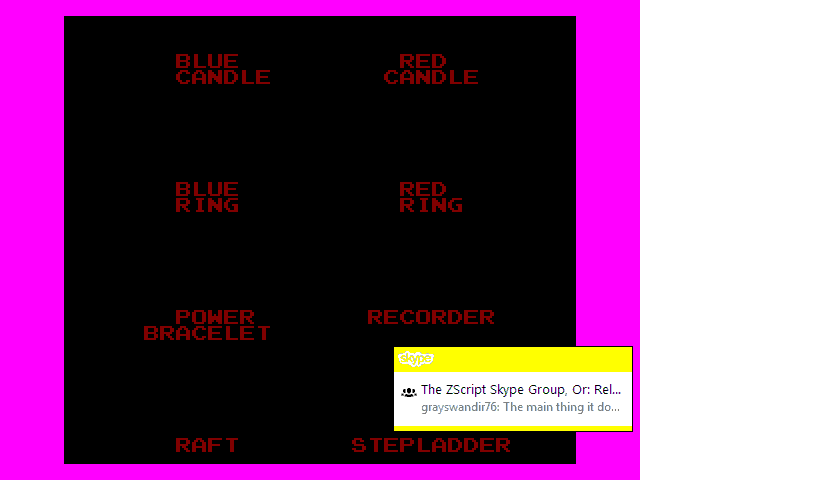
The pixel ratio is also incorrect, which you cannot see from that screenshot.
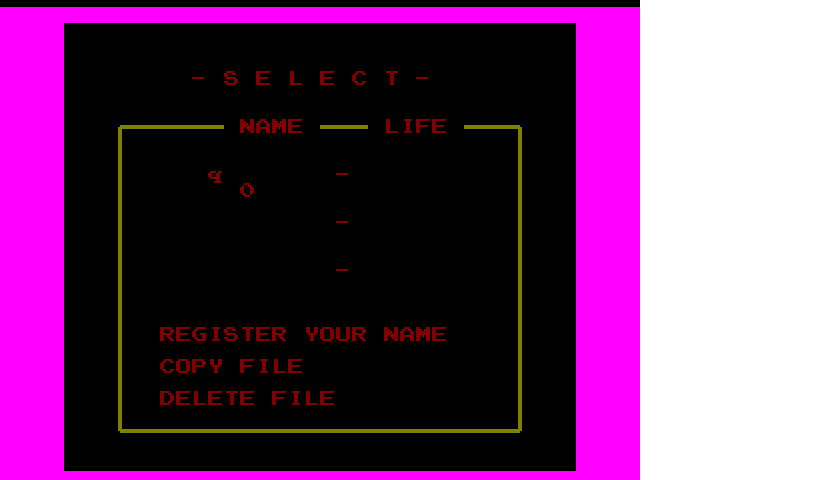
This is on Win7, not Win10.
Dropping out of fullscreen to windowed mode fixes the palette, so somewhere in the process of converting the desktop to 8-bit, it isn't properly setting the system palette.
Ok. I will fix the mouse issue.
The palette issue I will look into as well; it works for me on Win 10. To make sure I understand, the problem occurs when you
1. Start in fullscreen, or
2. Start windowed, go fullscreen, go windowed, go back to fullscreen;
but not when you
3. Start windowed, and go fullscreen (only once)?
DarkDragon wrote:Ok. I will fix the mouse issue.The palette issue I will look into as well; it works for me on Win 10. To make sure I understand, the problem occurs when you
1. Start in fullscreen, or
2. Start windowed, go fullscreen, go windowed, go back to fullscreen;
but not when you
3. Start windowed, and go fullscreen (only once)?
Correct, save that it does not occur if you start in 320x240. If you start with 640x480, and go to fullscreen, it likewise corrupts the colours. 😞
Other notes. The video mode becomes corrupt if you do fullscreen before loading a quest, from 320x240. If you load a quest (I tested 1st.qst) first, it plays with normal colours until you exit fullscreen. If you alt+tab out, and later return focus to zc, the colours are wildly corrupted.
I wish that I could show you, but trying to capture the screen with Print Screen grabs pure black, rather than the true display. Those other images also lacked some colours that were visible on-screen.
When returning to fullscreen after alt+tab, if you click the screen to freeze the game, then unfreeze it by clicking it, the in-game palette is partially restored. The border is still hot pink, and the subscreen colours are wrong.
System event popups also appear over the display, and flicker. For example, Skype notifications are drawn in the middle of the screen.
I'm seeing some framerate loss. I presume that is because of the debug flag on this
Yes, probably. Does it run at the full 60 FPS when you build in Release mode?
ZoriaRPG wrote:Correct, save that it does not occur if you start in 320x240. If you start with 640x480, and go to fullscreen, it likewise corrupts the colours. 😞
Ok, thanks. I will investigate.
I have not set that flag yet. I'll report on it as soon as I do.
I wanted to ensure that debug mode worked first, as that produced additional components.
I've fixed the mouse cursor issue.
The palette problem has me puzzled, though, since the code does save and restore the palette when it switches video modes.
Can you try your experiment (start Allegro in 640x480 mode, then switch to fullscreen) and paste your allegro.log file?
System event popups also appear over the display, and flicker. For example, Skype notifications are drawn in the middle of the screen.
Is this a new development? Or has this always been the case?
Are these problems on the master branch, or the alegg44-dx8 branch?
If the linker crashes it's usually because of corrupted (incompatible) libraries. An alternative method might be to remove libs from the linker until it replaces crashes with unresolved errors.
Maybe the flex/bison dependency thing is more trouble than before?
Are these problems on the master branch, or the alegg44-dx8 branch?
I've been talking to ZoriaRPG and they've been happening since 2.50.2 at least. Probably a problem with his system DirectDraw libraries? Gleeok, does fullscreen work for you?
Maybe the flex/bison dependency thing is more trouble than before?
It's only a problem if you have two different version of flex/bison on your PATH. Usually it Just Works (you have flex and bison installed) or does nothing to compile the ZScript language (ie, same as the old approach).
I'm still confused about which branch y'all are compiling on because the thread is called "CMAKE Branch." :P
The linkers are only crashing for the Debug build, I should mention that, as the Release build doesn't do that.
Interface bug: A user testing this branch reported that when he set the screen res for Zelda XD to its highest setting, it overflowed his display, and the menu was no longer visible to reset it. Might be good to add a dialogue 'Keep this new resolution' to these things that appears at 0x,0y of the window.
here is a but with window screen when its idle
in the gif I keep clicking in and out except for when the screen changes since that's when the bug happens
https://giphy.com/gifs/l4q8cB8Ye4occRKrC
Edit: it also seems the game updates when the window is idle
this might be the problem for the above bug
EditAgain: ZoriaRPG informs me that the game being active during the os window losing focus is not a bug.
Shadowblitz16 wrote:here is a but with window screen when its idle
in the gif I keep clicking in and out except for when the screen changes since that's when the bug happens
https://giphy.com/gifs/l4q8cB8Ye4occRKrC
Does this only affect the title screen?
[MENTION=1]DarkDragon[/MENTION]: Shadowblitz is helping to bugtest the parserscope build.
Can you explain a bit more the bug? There are a few frames before and after the "All Of Treasures" scroll where the palette is incorrect?
What do you mean you "keep clicking in and out"? Is this necessary to reproduce the bug?
Also is this windowed mode, fullscreen mode, or both?
[MENTION=1]DarkDragon[/MENTION]
the bug seems to fix itself when you click back into the game.
also I just clicked in and out to show that the game was active during the window being idle
and its during window mode haven't tested it with fullscreen
ZoriaRPG informs me that the game being active during the os window losing focus is not a bug.
however the palette problem while doing so is a bug. its just not a priority since it fixes itself when the window is focused again.
Ok. So if I understand correctly, the problem is that palette changes that happen while ZC is in the background do not take effect until ZC regains focus?
DarkDragon wrote:Ok. So if I understand correctly, the problem is that palette changes that happen while ZC is in the background do not take effect until ZC regains focus?
From what I saw, and his description, when he paused the game by clicking the window (i.e. clicktofreeze), it shifted the palette, and it reverted to normal when he clicked it to resume. This is what Im getting from this, but it does not happen to me.
IDK if it is also doing it when he merely shifts to another window??? He mentioned something about a dual-display, which pretty much says 'higher end video card'. I;ve no idea what GPU he has, but I believe he is using Win10.
I'm thinking that offering a doubleblit video mode, available as a menu option, whether in full screen, or windowed mode, might be our best solution for this. 'Doubleblit: Offers greater compatibility on newer OSes, but may be slower.'
I agree, and will add this when I get some free time. The idea would be to use the native desktop color depth and color-convert when rendering every frame.
DarkDragon wrote:I agree, and will add this when I get some free time. The idea would be to use the native desktop color depth and color-convert when rendering every frame.
Right. I would just make it menu toggle of some sort, so that it's up to the user to enable or disable. Hell, we can enable it by default, and if it slows the system, then the user can try disabling it... although we'll need to test both performance issues, and any new drawing issues that it might present.
I can confirm the palette issue. When ZC is in the background, the screen no longer repaints (the desired behavior) but palette changes still occur; this means that whatever is frozen on the screen will look funky when the palette for a different part of the opening sequence gets loaded in.
Clearing the screen to black on losing focus doesn't even fix the problem, since black on some palettes looks hot pink in others.
The fix would be to dig into where Allegro handles set_palette() and change the behavior so that it stashes palette changes and applies them the next the window regains focus, rather than immediately. But I'm not extremely motivated to do this... I think I'll declare this bug low priority for now. If you like, you can post it as a github issue, and I will take a look at it on the mythical Someday.
The ability to run ZC at native color depth (at a performance cost) is still on my short list, though (which will also fix this palette issue, for those using the option).
I believe I have caught up with the feedback in this thread:
- I've added a "native color depth" option in the video mode selection menu. Selecting it uses the desktop's native color depth, and converts ZC's buffer to this depth every frame. This carries a performance cost, so you can turn off native mode on older computers, but hopefully this resolves some of the driver issues you all are experiencing on modern OSes with 8-bit mode. I've reinstated the "-0bit" and "-8bit" command line flags to toggle this behavior.
- I've added 960x720 resolution to the menu, by popular demand. It uses "small" mode GUI layout since the large mode is aliased at this resolution.
- I've added a warning message if you try to switch to a resolution larger than your monitor supports.
DarkDragon wrote:I believe I have caught up with the feedback in this thread:
- I've added a "native color depth" option in the video mode selection menu. Selecting it uses the desktop's native color depth, and converts ZC's buffer to this depth every frame. This carries a performance cost, so you can turn off native mode on older computers, but hopefully this resolves some of the driver issues you all are experiencing on modern OSes with 8-bit mode. I've reinstated the "-0bit" and "-8bit" command line flags to toggle this behavior.
- I've added 960x720 resolution to the menu, by popular demand. It uses "small" mode GUI layout since the large mode is aliased at this resolution.
- I've added a warning message if you try to switch to a resolution larger than your monitor supports.
Nice. I'll do a build, and report any issues that I encounter with the new modes. Branch DD/alleg44, right?
Any chance you would make 'Release' the default, instead of "Debug', so that it isn't mandatory to set this every time? The linker crashes on debug need to be resolved, but in the interim...
One other suggestion: How about making the build date something that is read from system time, so that the ZC and ZQ info panes do not need to be manually updated in zdefs.h?
Any chance you would make 'Release' the default, instead of "Debug', so that it isn't mandatory to set this every time? The linker crashes on debug need to be resolved, but in the interim...
You should be able to just recompile within MSVC, after you pull? Does pulling from the repository reset the build configuration for you?
One other suggestion: How about making the build date something that is read from system time, so that the ZC and ZQ info panes do not need to be manually updated in zdefs.h?
I can look into this. The build number would still need to be incremented manually, though, so is there much benefit?
I found an issue with the GUI dialogue changes:
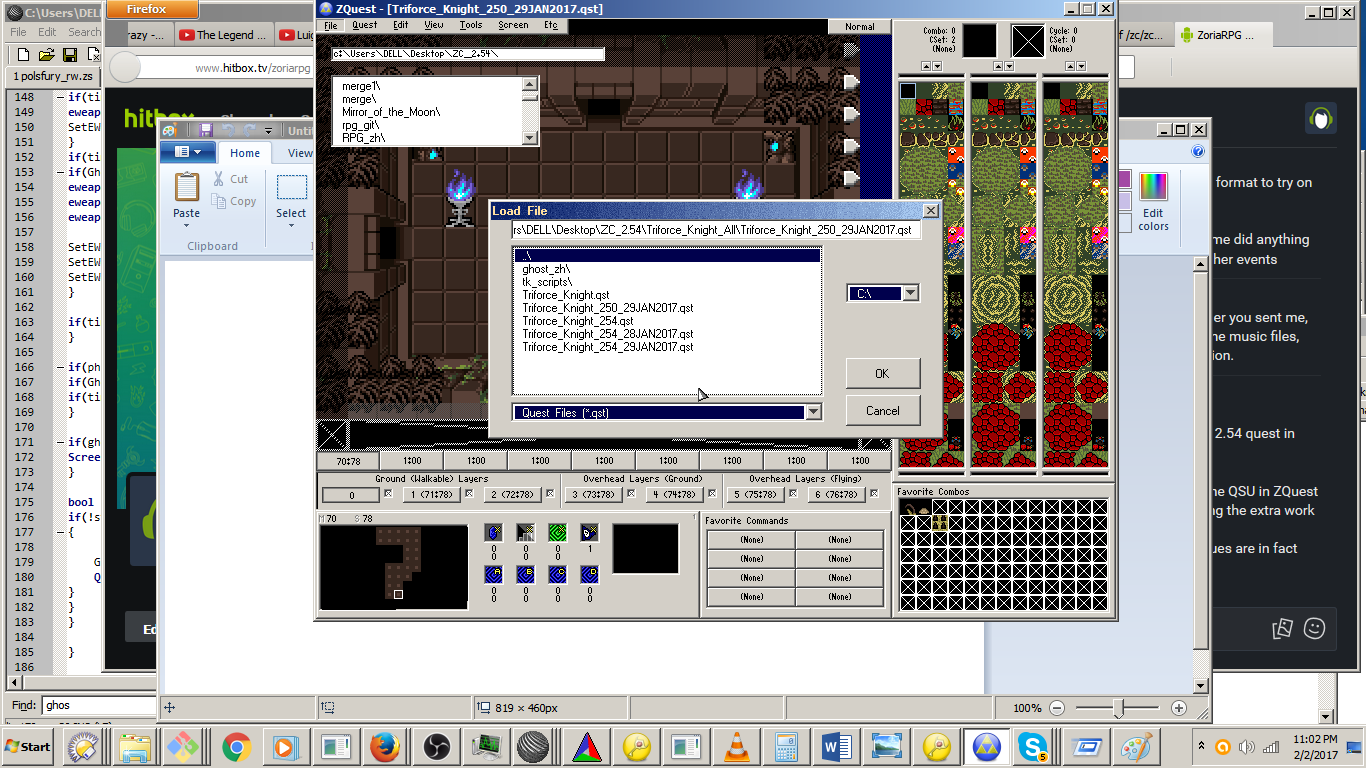
When loading a quest in ZQuest, if you change the path from whatever the default is, the lister does not update, and the lister contents become drawn at an offset.
After clicking in the lister selection again, it updates.
Specifics:
Bring up the load quest dialogue in ZQuest.
Click in the path bar, and change the path.
The lister will not refresh, and lister contents will be displayed at 0x0.
Click inside the lister, where the files are displayed normally.
The lister then refreshes.
The graphical issue does not vanish.
Changing the path again, repeats the problem. (It does not 'go away' after one occurrence.)
Tested in 320x240 and 640x480, using 'Truecolour', on Win7.