Read-only archive of the Armageddon Games Forums Archive (2000–2026) · About this archive

Need Help Running Zelda Classic on Mac OS X

11 replies · 9,281 views · Started 31 July 2014

My OS version is 10.5.8 (Leopard). I downloaded the Mac OS X version of Zelda Classic v2.50. I extracted the Zelda Classic folder and placed it on my desktop. Inside the folder are the following files:

std.txt
string.txt
Zelda Classic (green icon with the original Zelda logo)
ZQuest Editor (blue icon with the Triforce)
zquest.txt
zscript.txt
zstrings.txt

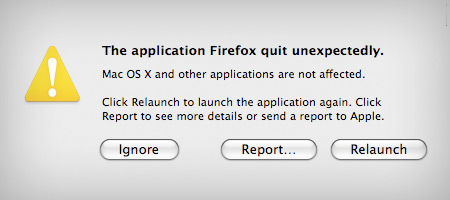
I try to open Zelda Classic and I get an error message. I try opening ZQuest Editor instead and the same thing happens. The error message is the following (replace Firefox with Zelda Classic or ZQuest Editor):

http://www.hongkiat.com/blog/wp-content/uploads/macerror.jpg

Well, if you could click "Report..." and copy/paste the error details here, we might have a better idea of what the issue is. If I were to make a guess, though, I'd say the folder you downloaded is missing key files.

CaRmAgE wrote:Well, if you could click "Report..." and copy/paste the error details here, we might have a better idea of what the issue is.

I doubt anyone would understand it but here it goes.

Problem Details
Process: Zelda Classic [57540]
Path: /Users/*Confidential*/Desktop/Zelda Classic/Zelda Classic.app/Contents/MacOS/Zelda Classic
Identifier: com.armageddon.Zelda Classic
Version: ??? (???)
Code Type: X86 (Native)
Parent Process: launchd [171]

Interval Since Last Report: 16644440 sec
Crashes Since Last Report: 78
Per-App Interval Since Last Report: 0 sec
Per-App Crashes Since Last Report: 6

Date/Time: 2014-07-31 18:33:27.637 -0400
OS Version: Mac OS X 10.5.8 (9L31a)
Report Version: 6
Anonymous UUID: 4D9B6C26-B085-4AA2-A247-EB7F6009111E

Exception Type: EXC_BREAKPOINT (SIGTRAP)
Exception Codes: 0x0000000000000002, 0x0000000000000000
Crashed Thread: 0

Dyld Error Message: unknown required load command 0x80000022

System Configurations
Model: iMac7,1, BootROM IM71.007A.B03, 2 processors, Intel Core 2 Duo, 2 GHz, 2 GB
Graphics: kHW_ATIr600M74Item, ATI,RadeonHD2400, spdisplays_pcie_device, 128 MB
Memory Module: global_name
AirPort: spairport_wireless_card_type_airport_extreme (0x14E4, 0x88), Broadcom BCM43xx 1.0 (5.10.91.22)
Bluetooth: Version 2.1.9f10, 2 service, 1 devices, 1 incoming serial ports
Network Service: Ethernet, Ethernet, en0
Network Service: Adaptateur Ethernet (en2), Ethernet, en2
Network Service: Adaptateur Ethernet (en3), Ethernet, en3
Network Service: AirPort, AirPort, en1
Network Service: Parallels Shared Networking Adapter, Ethernet, en4
Network Service: Parallels Host-Only Networking Adapter, Ethernet, en5
Serial ATA Device: Hitachi HDT725025VLA380, 232,89 GB
Parallel ATA Device: MATSHITADVD-R UJ-85J
USB Device: Built-in iSight, (null) mA
USB Device: Keyboard Hub, (null) mA
USB Device: USB-PS/2 Optical Mouse, (null) mA
USB Device: Apple Keyboard, (null) mA
USB Device: IR Receiver, (null) mA
USB Device: Bluetooth USB Host Controller, (null) mA

CaRmAgE wrote:If I were to make a guess, though, I'd say the folder you downloaded is missing key files.

I haven't touched anything, everything is as in the download I got from this website.
I unfortunately don't know much about Mac, but there are definitely files missing (ZLaunch, 1st.qst, 2nd.qst, 3rd.qst, and 4th.qst from a quick glance). Perhaps [MENTION=38582]Saffith[/MENTION] knows what's wrong.

This is a link to Saffith's dropbox and the Max version of ZC 2.50.1 RC2 in particular; that version might work... it's worth a try at leastl.
https://www.dropbox.com/s/a1ruw61nzq8jmfh/zc-2-50-rc2-mac.tgz

CJC wrote:I unfortunately don't know much about Mac, but there are definitely files missing (ZLaunch, 1st.qst, 2nd.qst, 3rd.qst, and 4th.qst from a quick glance). Perhaps [MENTION=38582]Saffith[/MENTION] knows what's wrong.

Why would the official download link be incomplete? Anyway, I sent a PM to Saffith. He's one of the programmers responsible for the application so you might be right about him being able to help me.

CJC wrote:This is a link to Saffith's dropbox and the [Mac] version of ZC 2.50.1 RC2 in particular; that version might work... it's worth a try at least.
https://www.dropbox.com/s/a1ruw61nzq8jmfh/zc-2-50-rc2-mac.tgz

It didn't make any difference. It also lacked all of the text files for some reason.

You could take a screenshot of your whole monitor display and post it so everyone has a better and clearer view of how your Max version doesn't work at leastl.
�Que pasa con usted? Habla "Max," no habla "Mac." �""s aqui?

I did some research last night on the error code posted:

Flaxo wrote:Dyld Error Message: unknown required load command 0x80000022

It seems that the Mac version of ZC was compiled using Snow Leopard. As a result, ZC is using a load command that Leopard doesn't understand. This blog post describes the problem.
Apologies if I'm wrong (I also don't have a Mac...yet), but every place where I did research pointed to the same issue.

CaRmAgE wrote:It seems that the Mac version of ZC was compiled using Snow Leopard. As a result, ZC is using a load command that Leopard doesn't understand. This blog post describes the problem.
Apologies if I'm wrong (I also don't have a Mac...yet), but every place where I did research pointed to the same issue.

Wow, you actually made sense out of that gibberish and found the exact problem. It seems like the programmer (Saffith?) in charge of the Mac OS X port did something wrong and that only him can fix this. This website explains the root cause:

"Generally, if you are targeting your [application] to run on multiple versions of Mac OS X, you should use the 'least common denominator' approach of developing on the older OS version. This is because newer versions may have extended the base OS API but generally newer versions will maintain backwards compatibility."

Anyway, now that the problem has been found thanks to you, it should be easy to fix. I just have to wait until Saffith logs in and starts working on it.

I don't have access to an older version of OS X, but I can certainly give the compile options a shot. I'll try to get to that in the next day or two.

Saffith wrote:I don't have access to an older version of OS X, but I can certainly give the compile options a shot. I'll try to get to that in the next day or two.

Thank you very much. I'll tell you if it works or not.