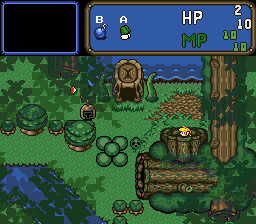
It's official, with all the scripting I've done ZC can function like Z3.. With the exception that I haven't taken the time to write up the hookshot scripting for the scrolling segments.
All the collision is done automatically via script so all the user will have to do is tell the script code whether or not their DMap is using scrolling, and the top-left most screen of the scrolling segment, and what the dimensions are for the edges of the scrolling segment of the Dmap, because the same DMap can actually be used for more than one scrolling section, with different boarders for each segment, so the screen will stop scrolling when Link is at the edge.
Here's a short video:
http://www.youtube.com/watch?v=yLmyl2V8jKw
The enemies only have 4 modes of movement so far also:
1)Just like as if they were not modified and move like ZC enemies did before.
2)Going towards Link/homing.
3)Going away from Link/Running away
4)Circling Link.
Wall bombing, swimming (I even made the flippers equippable and Link swims faster overall with them on, and has a boost like LttP), the enemy and Link collision with walls, and Warp are all done. The user will be able to make tile warps in the scrolling screen by putting them on the ZQ the regular way.
The few things I have left to get done:
1)Hookshot for scrolling portions.
2)Pushblocks - The most challenging thing to accomplish: I could easily write up FFC, drawtiled, or other type of pushblocks.. Writing them up so that the pushblock happens automatically in the scrolling segments is a bit of a brain buster though.
3)Key Doors: Which is exactly like bomb walls so that's pretty much done - a slight mod of the other script.
I made that alternate key door and shutter door, but those are ffc and not modded for scrolling yet, also require a little bit more setup than just putting a door on the screen with ZQ.
4)Bush Burn: Also exactly like bomb walls so that's gonna be a quick fixup.
5)Pegasus Boots: I have everything I need for this script in my head already, just haven't got around to it yet. Also, I need to check out LTTP since it's been over a decade since I played through it and see how the behavior is. I recall him staying completely still, charging up to run, and then dashing in a straight line until a collision or the player stops.. Then I also have this memory of a stutter step forward whilst charging to run.. Maybe that was a different game though.
6)Block Maker Cane.
The rest of the things I have planned for my ZC stuff are all optional, and not really an essential to functionality..
Like lock-on boomerang, which is already done - some modding of the lock-on missile script, complete with multiple target selection.
Wolf-Link style lock on and lunging for scrolling : It's already done for regular overhead, sideview is okay also, nether overhead or sideview scolling can use it right yet though.
Since there are random weather patterns in my game, and the wind changes direction at random already, Wind-Waker type stuff is just one "baton" item in the box and a button/dpad press away from there.
A small playable portion of a game involving the clock, days, events, and the looping of those things: This is already done actually, the events I made in the original quest file weren't all that great though, there was a mermaid at the dock and people talking about it if Link missed his chance, gave hints towards what time it was, etc.. Then he could restart the clock and go there and she'd be there and give him a sword... I had plans for a guy to be blocking the entrance to level 2 until 9 A.M. Day 1, regardless of Link's other activity.. That way he'd be able to access Level 2 pending the condition of having the game on for 1 hour, despite everything else going on, then make the ability to jump ahead some hours available after beating Level 2, so upon restart he could get there in a quick minute.
I have LttP Ganon sprited and ready for scripting. I think I'm not going to try to make him the exact same though. Probably a lot more difficult to defeat and quicker or something. I ran through LttP in approximately 2.5 hours in my younger days, 100% Completion, all items, hearts, etc, and it felt easy to do.
This stuff being said, I would like to hear some voices/read opinions about your take on making this scripting a package for quest creation. I know I've read more than one thread in more than one forum about people making LttP remakes, and they all said they actually don't do screen scrolling or other things actually LttP-esque, but moreso using the graphics.
So I went and get the LttP tileset and checked it out.. It's not really that good because the NPC are their usual size and Link for some reason was crunched into a 16x16 pixel space instead of using a hitbox offset and an extended tile.
Pending an actual modification of that tileset, (Since I usually lack the patience to rip and grab all that stuff myself I would use it as a base, *hope to get full permissions first*), it would maybe be most optimum to use that tileset in conjunction with this script for a bundled quest making package.
The modifications will have to be a) Putting in all the graphics for stuff that isn't in it already for 'Essential' things, mainly the debugging portion, and a few other things. That way if someone picked it up, even if they didn't/don't like my graphics they would know exactly what's going on and change the tile numbers or copy over mine. b)Make Link's tile the normal size. It's actually totally ridiculous looking to see all the normal LttP stuff and this crunched Link in the middle of it.
I'm using the DoR tileset and I like it. The LttP tileset would be great to use too though.
I've read a lot of stuff now about LttP remakes.. I would actually like it a lot to see this happen. It'd take me a year working non-stop to tile out the whole game myself though... Which is why I'm going to start a new thread about this topic.
Edit: The only "special" setup for this whole scrolling screen process is that when Link is warped to a DMap with scrolling, he actually needs to be warped to the DMap and screen directly -1 of the DMap of layer 0, and the quest creator needs to put in the Screen X and Screen Y of the scrolling screen parameters. So for Screen 0,0 of Dmap 2, scrolling a 6x4 screen, he or she would have to warp Link to Screen 0,0 of DMap 1, and input 6 and 4 into the scrip that when Link is on DMap 1, Screen 0,0, the X parameter is 6 and Y is 4.