About to partition my hard drive to try it out. Anybody use it yet?
Windows 8
I'm using it on my desktop 😃, So far I love it. fast, stable, fast boot time. there's not much you can ask for 😊.
And on top of that I was able to buy it for $69.99 in a store. this is one of the cheapest Windows OS I've ever bought.
I have to say I like it better then windows 7 and windows vista. I upgraded from a Windows vista and never looked back :P
I also use it as my desktop. Before it came out I was worried about it, but it works very well. Microsoft also changed the interface into Team Foundation Systems when using Visual Studio 2012, but I have started to like the change in work flow. I was able to upgrade Windows 7 for just $39.99, which was also very awesome.
Lol, paying for things.
You didn't pay for it!? >😞 Oh man... you are in trouble :P
Windows 8 is garbage
When I learned about Windows 8 and that "metro" was the future of windows computing, I bought a used laptop and installed Debian. I am now 100% on Linux.
I don't have a great technical or philosophical reason for this. I just think the Metro UI is literally the stupidest thing I have ever seen on a computer, and I will never voluntarily use a computer that has it.
Majora wrote:Windows 8 is garbage
[video=youtube;29M_VElHoFI]http://www.youtube.com/watch?v=29M_VElHoFI[/video]
I've played with it at school some. It takes some getting used to. I'm not a huge fan of the "metro" interface so far, but I can see getting used to it. I really would like to have a touchscreen interface to test Win 8 out further. I haven't gotten to try and install anything or run intensive programs yet. The kernel is the same as it was in Win 7, so I don't think there should be many problems along the lines of compatibility with current software. I got a copy free through the school, but I need to build a new computer before I install it.
Majora wrote:Windows 8 is garbage
Well one mans garbage is another's treasure :P. Really though I don't see why some people don't like it.
Ventus wrote:I have to say I like it better then windows 7 and windows vista. I upgraded from a Windows vista and never looked back :P
Can you expound on what makes it better than Windows 7? I reluctantly upgraded from '98 to XP several years back because..., well because a decade old OS was getting hard to justify. I switched to Win' 7 as soon as it was available because XP did not do it for me and I have been quite content with it. Are there any significant improvements or is it merely more superfluous application integration?
-m.
Mercy wrote: or is it merely more superfluous application integration?
Boom!
Mercy wrote:Can you expound on what makes it better than Windows 7? I reluctantly upgraded from '98 to XP several years back because..., well because a decade old OS was getting hard to justify. I switched to Win' 7 as soon as it was available because XP did not do it for me and I have been quite content with it. Are there any significant improvements or is it merely more superfluous application integration?-m.
Well... Its hard to say what has really improved. I just now it runs faster then it did. and use's less resource's to operate. And with that new booting technology the added into windows 8 It only takes about 10 seconds to boot up.
And while I'm at it. I've never had a freaking working intstall of windows 7 to justifie that it was any count. Every time I ever tried it. It would stop booting correctly after 2 days of use.
7 was the first Windows OS I've ever had trouble with. So i'm going to say its better then 7.
That's all there is to it.
I'm still using XP. Enough said. 😃
I'm sure that once support for XP by programs starts being dropped I'll just start using a Linux distro.
I've only used 7 at work not home, so I have limited experience with it. It seems to me there is not a lot in the desktop mode that is different from 7. There are a few things added, like the "go up a level" button that should have been there in the first place. I suggest sticking with 7 if you are comfortable with it. I've been using the release preview of 8 and decided it was tolerable. I'll be getting a new lop top soon and everything comes with 8 pre-installed now. I've been able to minimize the "metro" side of the OS and run mostly off the desktop. I will have to say that I really like the fast boot up though. I never shut my current laptop off because I don't want to wait ten minutes for it to boot or shut down. Same system boot up in ten seconds on Win 8. That's nice.
The "metro" or tablet side is nice... on a tablet. I don't like the move to apps that can only be obtained through the store. I like to get independent programs (like Zelda Classic) and install them on my computer.
Mercy wrote:Are there any significant improvements or is it merely more superfluous application integration?-m.
Appears to be so. I had already decided on a fresh Windows install, so I decided to give it a try.
After looking around, it's not very different than 7. The Metro is rather foreign right now, but I can see it being useful after getting used to it and further development.
I decided to go ahead and make the "permanent" switch (barring any major issues that appear) due to a few features that I think will be pretty handy.
I'll post again before I head back to work Thursday morning with an update.
Windows 8 looks like a bloody automatic teller machine to me. I'd take either 7 or XP over it in a second. I'd really much prefer to run Arch Linux on everything, but they went and jacked up the installation process, so I'm on Windows for now.
Gleeok wrote:I'm still using XP. Enough said. 😃
Right there with you. Except I hate XP and have since it was released. The only reason I used it over #! is because I couldn't get #! to extend my desktop to a second monitor.
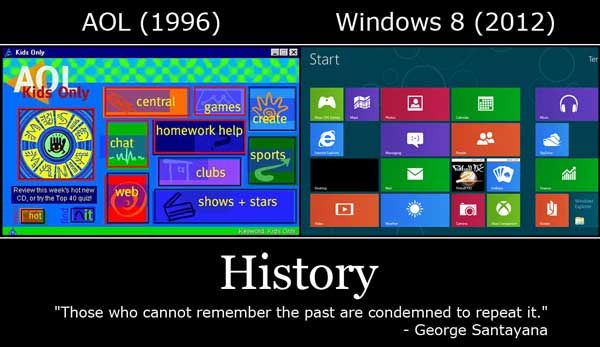
Beldaran wrote:
huh... That looks almost the same? What the hell!? Oh my god AOL Ripped of microsoft :P *Knows Microsoft ripped AOL off*
THAT is windows 8?!? I've seen SNES games with better user interfaces.
Gleeok wrote:THAT is windows 8?!? I've seen SNES games with better user interfaces.
Anything is going to fail easily when being compared to the greatest thing in the history of the world.
Find a video. Once you push the desktop, not a lot is different. They're just trying to get into the app game since tablets "are the future." (Please God, no.) Also, this exists. Personally, I'm not using it, but I can see why others would want to.
Beldaran wrote:
My first thought, "I miss words."
Then, "I became literate for this?"
This must be how older Asians feel about the death of Kanji.
I do appreciate all the feedback. Metro seems a little clumsy to me but probably because I am strictly a dt user at the moment.
Xyvol, were you really taking ten minutes to boot Win'7? Once my network issue was fixed, my boot time dropped to about ten seconds for Win'7. I would suspect your long boot time to be other than merely the OS but if a fresh OS upgrade fixed the problem, no point pondering what is fixed.
I agree with the dislike for proprietary store apps. That is the main reason* I do not and will not own any devices that start with an "i".
-m.
*there is also something about preference for foreign labor, reprehensible working conditions for said labor, and gross wage disparity but that is for another thread.
Mercy wrote:Can you expound on what makes it better than Windows 7?
The start screen is definitely one of my favorite features. I probably use my keyboard at least 75% of the time; really when I have to use my mouse is when I use it. Given that one of the most common shortcuts I use is Windows+R which launches the Run dialog so I can execute a command. I like the Run dialog, but the problem is that I have to know the exact command to run.
The start screen offers a very fast search just by typing, no shortcuts or explicit focus (other than in the Start Screen) are required. Windows Vista first introduced the Start Menu search, and it was very slow. Windows 7 definitely increased the performance, but Windows 8 is near instantaneous for me.
The search is very robust too. It categorizes the results based upon where it searched. For example some categories are Apps (those in the Start Menu now), Settings (Control Panel), Files (Disk Drive). In addition to the "Windows" searches, you can also search inside of an App just by choosing it as a category. Searching for Portland could result in Portlandia on Netflix, the location on the World Map using Maps, or the local weather using Weather.
Mercy wrote:Xyvol, were you really taking ten minutes to boot Win'7?
My boot time after upgrading (from Windows 7) does appear to be faster, however it is only barely noticeable. The difference between the two is probably 2-3 seconds faster with Windows 8. My boot time is definitely under 15 seconds.
I get the same results as Flash Man, just a few seconds faster.
[MENTION=38796]Xyvol[/MENTION], you definitely had some issues.
I have a Windows 7 machine as well. I reboot it once every couple of weeks. I can't imagine noticing 2-3 seconds of boot time.
My apologies, I failed to mention it was Vista that was running on my laptop previously. That's probably the reason for the long load time. I blame work for distracting me while attempting to write a post.
My only experience with 7 is using it on the work computer, so mostly using Excel and Chrome, and I don't notice much difference in 8's desktop. The main thing is the start screen, which leads you into app world. I unpinned all the apps and pinned program icons to it instead. Makes it more tolerable in my opinion, even though half the start menu functions have been moved to setting on the right side pop up bar.

Xyvol wrote:My apologies, I failed to mention it was Vista that was running on my laptop previously. That's probably the reason for the long load time. I blame work for distracting me while attempting to write a post.My only experience with 7 is using it on the work computer, so mostly using Excel and Chrome, and I don't notice much difference in 8's desktop. The main thing is the start screen, which leads you into app world. I unpinned all the apps and pinned program icons to it instead. Makes it more tolerable in my opinion, even though half the start menu functions have been moved to setting on the right side pop up bar.
I really like the look of using the start screen like that. I didn't even think to unpin the initial apps and pin my more used programs. This actually makes me more interested in starting my new computer. Black Friday Newegg deals, here I come.
@[B]ctrl-alt-delete
[/B]
I like the idea of the Classic Shell. For me, however, I need to get used to using Win 8 as intended. I need to be as familiar with Win8 as possible so I can support it better.
ctrl-alt-delete wrote:Also, this exists. Personally, I'm not using it, but I can see why others would want to.
Unsure about Vista as I didn't use it too much, but Classic Shell fixes tons of Windows Explorer bugs Microsoft introduced to the Windows 7 Windows Explorer (In comparison to XP's). It also includes support for numerous ease-of-use enhancements. It's a heck of a lot more then just the classic Start Menu.
I'm beginning to fall for Windows 8's Charms...see what I did there?
When I found out that the action icons that pop up to the side of the screen were called charms, I cringed. Seriously? Could they think of something more stupid and cheesy to call them? The new start menu is called the fairy playground, and apps are call daydreams. The task manager has also been renamed "Santa's List".