Back in ancient times (2007) I posted about a Zelda 2 quest and even showed some screenshots. I may have actually released a demo, I'm not sure... Anyway a series of events happened that kept me from working on various projects, Zelda 2 included and I've been absent since then.
Anyway I've started up the project again and have started working on the overworld. The quest features smooth scrolling side view areas and the overworld is also smooth scrolling (in 4 directions) - with full collision detection. I've upgraded the quest to 2.5 build 910.
Here are some screenshots from my resurrected Zelda 2 in Zelda Classic project:
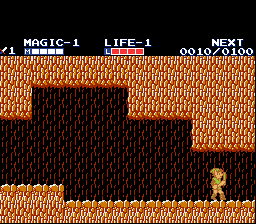
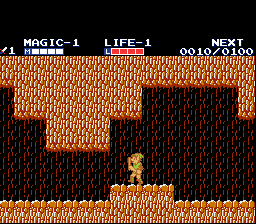
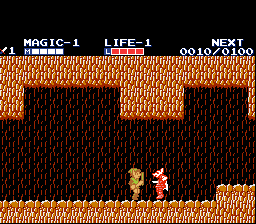


There is no subscreen visible when in the overworld.


In the overworld Link is big right now but that will be fixed soon.
For more information see this topic on PureZC (including an old outdated prototype demo): http://www.purezc.com/forums/index.php?showtopic=39651&st=0
Also note that the jumping animation bug seen in the second (older) movie has been fixed already.
Also some movies of it in action:
http://www.youtube.com/watch?v=QuystzkuobQ&feature=channel
http://www.youtube.com/watch?v=xI4BqVwQVXc
http://www.youtube.com/watch?v=ThBYndcku60
http://www.youtube.com/watch?v=hu81TwlW96Y
http://www.youtube.com/watch?v=sFjVPsKdqw8
This is awesome! Any chance you'll give out the tileset?
The plan is to give out the tileset and scripts but also give a tutorial on how to do your own smooth sidescrolling or 4-way scrolling. But I'm going to finish the quest first to work out all the kinks.
Smooth scrolling would be wonderful! 😊
Here's a video showing several improvements:
* Jumping animations in sideview are much better now.
* Overworld now uses small Link.
* Proper collision detection in the overworld.
* Working warps (palace and forest shown) in the overworld.
http://www.youtube.com/watch?v=ZfNeLSLF7mc
Impressive stuff, Blueknight! 😊
Your not using the correct colours for the overworld. use this palette when ripping graphics from a emulator 😊 http://www.firebrandx.com/downloads/fbx2pal.zip
Thanks for the comments.
Franpa, you're correct that the palette is a little off. I was planning on revisiting the problem. I will look at you palette, thanks.
I've added the latest video I made:
http://www.youtube.com/watch?v=ThBYndcku60
This shows me exploring West Hyrule, it's almost entirely laid out now.
Basically the script has been updated so you can lay out your screens normally, then in the script you pass in parameters telling it how many screens to scroll and it handles scrolling and collision. So it can now support scrolling 8x8 screen areas - and since the script calculates the proper region to render and only reads and renders those combos that it needs it renders at the same speed for 2x2 as 8x8 screen areas. Similar for collision, it only reads and processes the combos that Link (or an enemy or whatever) could be colliding with.
This will be my last "tech" video, next time I'll show real gameplay. 😃
Most impressive!
Now, I'm not too clued-up on Zelda 2, but isn't that Western Hyrule (being on the left), rather than Eastern though?
Joe123 wrote:Most impressive!Now, I'm not too clued-up on Zelda 2, but isn't that Western Hyrule (being on the left), rather than Eastern though?
D'oh! Of course it is... :googly: I'll edit the text. You've been a very helpful lately, thanks.
I've been working on getting towns fully functional. So far I have stationary NPCs and signs working and doorways working. In addition I've setup the interiors. Here's a video:
http://www.youtube.com/watch?v=0zqpPomznVI
Next up is moving NPCs, NPCs that come out of houses and handling healing, magic recharge and Wise Man house entry properly. Once the towns are done, I'll move on to combat!
As a side-note I've decided that while I'll follow the original quest fairly closely, there will be some twists along the way. For example many of the requests that you're given before you can see the wise man in each town will be modified - there will be more to do outside of the palaces. So for the starting area, there will be a quest to complete before getting the Shield spell (its a freebie in the original). The quest will involve a new cave/mini-dungeon (featuring the first vertically scrolling area in the game). The jump spell quest will probably stay the same, though other wise men will require more work too. There will be other surprised too. 😊
franpa wrote:Your not using the correct colours for the overworld. use this palette when ripping graphics from a emulator 😊 http://www.firebrandx.com/downloads/fbx2pal.zip
This palette is a NTSC A/V optimized palette, it is not one from a PAL system and it is not from RF out, it is from Composite out (standard A/V).
Very impressive. Very impressive.
I bet there's still a ton of work to do, though. I wager your sideview engine doesn't let you use the standard ZC combo types or flags or anything like that. I also bet that you have more work to do on how enemies interact with scrolling.
Plus, the big link animation is pretty awful!
Still, I don't want to sound too negative. This is mostly just a win sandwich. It is made of win and awesome.
C-Dawg wrote:Very impressive. Very impressive. I bet there's still a ton of work to do, though. I wager your sideview engine doesn't let you use the standard ZC combo types or flags or anything like that. I also bet that you have more work to do on how enemies interact with scrolling.
Plus, the big link animation is pretty awful!
Still, I don't want to sound too negative. This is mostly just a win sandwich. It is made of win and awesome.
Basically I can set the combo types and flags and in the script read them back to do various things. For example, I use a certain range of flags to specify terrain type for the overworld map. This way I also know which type of terrain Link is standing on for random encounters.
As for Link's animation - its laid out the same as the original game - except without the bouncing (to be fixed). It looks bad because its actually playing too slow - which I also have to fix.
Anyway there will be a full game-play demo soon, featuring the first area of the game - part of the overworld, 2 towns, 1 palace and a bunch of caves. The towns almost completely work now - NPC text, wandering NPCs, NPCs where you talk to them and enter their house for healing, restoring magic or to go inside and visit the wise man (if you meet the requirements). Next up is being able to collect the various items in the caves (like Magic containers) including those needed to get in the wise man's houses. After that I focus on scripting the rest of the enemies needed for the demo and finishing up the combat (block/strike up/down plus spells).
I have a new video, showing an early version of the combat system. The collision issues and animation issues have been worked out in the side scrolling areas. This video shows Link with the proper walk animation, crouch, attack high, attack low and proper jump animation. It shows one of the enemies (Bit) that Link can kill. Upon killing the enemy gives experience points. In town it shows wandering NPCs (only a few have been setup, to test, the final version will have them all). It also shows the NPCs that let Link in their house to heal or restore magic. The NPCs that let Link in to see the Wise Men use the same script. So this pretty much finishes off the town scripts and the combat system is well under way. 😊
http://www.youtube.com/watch?v=xI4BqVwQVXc
A small update (also posted at PureZC).
I have Link taking damage from Z2 enemies, including the knock-back and animation (including palette cycling and flickering) like in Zelda 2. In addition the enemy scripting is coming along fine, I didn't do much today but I can show some of what I have done. Below are two screenshots, one shows Bit (from the movie) and Bot - you can see Bot jumping. The other screenshot shows the Bits and Moblins (guys with spears). Bit and Bot use the same script with a type input, Bot does more damage and jumps sometimes, which is implemented. And the Moblins are spawned outside the visible screen and walk across in either direction. And already they all share some functionality (like hurting link).


This covers both the "easy" and "hard" plains encounters for the demo area. Next up is the forest encounters, followed by the desert of course.
Looks like it's about time for another technical demo.
Also, how did you do the scrolling through areas? I just thought about it and it would be perfect for a LttP clone. Could it be expandable to scrolling through say a 4+ screen area(not just sideways)?
bobrocks95 wrote:Looks like it's about time for another technical demo.Also, how did you do the scrolling through areas? I just thought about it and it would be perfect for a LttP clone. Could it be expandable to scrolling through say a 4+ screen area(not just sideways)?
I've shown videos before where the overworld was scrolling, for example:
http://www.youtube.com/watch?v=ThBYndcku60. It can handle scrolling 8x8 screens just fine, probably more. See the first post for a list of videos you can watch made from this quest. 😊 Anyway there will be a game-play demo soon with the first area complete, this includes 2 towns, 1 palace, several caves and part of the overworld.
Guess I'll have to wait for the demo to see how the 4-way scrolling script works. Is it easy to use?
I didn't read through the whole thread, but did anyone address the fact that the OW palette is fugged-up?
Shazza Dani wrote:I didn't read through the whole thread, but did anyone address the fact that the OW palette is fugged-up?
Yes, franpa mentioned it before. I know that the palette isn't right, its something I'll address before the game-play demo.
bobrocks95 wrote:Guess I'll have to wait for the demo to see how the 4-way scrolling script works. Is it easy to use?
Well... that depends on what you're doing. If all you want is 4-way scrolling with collisions then its really simple. If you want warps, its a little more complicated but not bad. It gets tricky when you want to add enemies or do things with other combo types - because that requires more scripting. Also I'm still tweaking things to make them easier, faster, etc.. It's certainly good enough to make a Zelda 2 quest properly but I haven't done any work to make a Z3 style quest a reality. At some point, though, I'll release all the scripts with tutorials on how to make your own scrolling areas.
Ouch, sounds painful since we're trying to put enemies, warps, etc.. We may just stick with traditional Zelda scrolling if it's too difficult.
Don't get me wrong, actually placing enemies or setting up combos is still done through the normal tools. I just mean that you have to write scripts for enemies or to do specific things based on combo data. So its not constantly difficult, but you do have to do a lot of scripting initially.
Oh, you're talking about scripting the enemies? I was talking about using this in a Z3 quest, hence any scripting is already necessary if there isn't an enemy that duplicates the one we need. Or do you mean that additional scripting is required for the enemies to act correctly with the scrolling areas? Because unless Russ has become a scripting master in 4 months, this is going to be hard to use.
Yes the scripts would need to be modified to work with the scrolling. Since my enemies have been made this way from day 1 it's not a big deal for me, but reworking all your enemies might be a problem. In reality retrofitting a quest to use the scrolling probably isn't a good idea anyway, now that I think about it. Again mine has been built with this in mind. However I think if you build your quest with this in mind from day 1, then its doable.
Well as I said before, when this is done I'll release everything with tutorials - including how to make custom enemies that work with scrolling - so if its not useful for your current quest you can still use it for your next quest. 😃
I continue to wholeheartedly support this amazing endeavor.
C-Dawg wrote:I continue to wholeheartedly support this amazing endeavor.
Thanks! Remember to try out the game-play demo when it's done. 😊
Another update.
All the random encounter environments are setup. Now I have to implement red Octoroks and Lowders and all the non-palace enemies will be done for the demo! Rat Heads are already done, so that just leaves a couple of enemy types - and the first boss - for the palace. As you can tell, the enemies and combat are coming along nicely.