This seems easy enough to do, but I don't know. Okay, you know pkmnfrk's NPC script? Yeah, see that would be a good basis. I would like to have an NPC script like that which displays a black background under the message. Sort of like this:
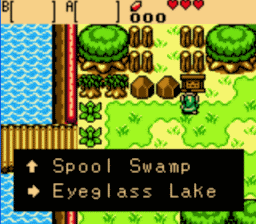
Okay, a lot like that. This may or may not already be in the showcase, but I've searched through several pages and cannot find it. Pkmnfreak's NPC script makes it hard to distinguish the string/message from a varied background, even when using a different color for the string. Could anybody do this?
The script doesn't change the background I don't think, it just plays a string. Therefor, you would have to change it in the string editor.
Go to the tile editor.
Make a black tile.
Copy it so that you have 4 in a square shape.
Go to the string editor.
Select a string.
See that little black box in the right-middle, below where you type in the string?
Click it.
Select the top left tile of the square you just made.
Repeat for all strings.
Squee! Now I feel like an idiot and a newbie, though. Oh well. Thanks so much!
I should amend the script's page, since this question has come up before. I wish there was a way to change the background of a string, though. I guess it's just another thing to work around with my custom messa- er, I probably shouldn't say anything at this point...
Hmm.... that's odd. I set the background of all the strings to a pure-black tile that has the exact same tile to the bottom, right and bottom-right of it. They're basically filler tiles included in the tileset. However, they don't show up behind the message. Why is this? Is it because black is counted as a "transparent color"? Or what?
Amaster42 wrote:Clarified:
Do this just once
Do this for every string
heh, I thought that went without saying really.
And I believe the transparent colour's not counted as transparent in a string background, but it may have changed...
Joe123 wrote:heh, I thought that went without saying really.And I believe the transparent colour's not counted as transparent in a string background, but it may have changed...
It may have changed, though I don't know. I'm using 901, though I'm trying to upgrade every time they put a new build on shardstorm. That's kind of hard. But anyway, I know that it's counted as transparent in basically everything though I don't know about strings. Unless there's something I'm doing terribly wrong.
Here's some screenshots:
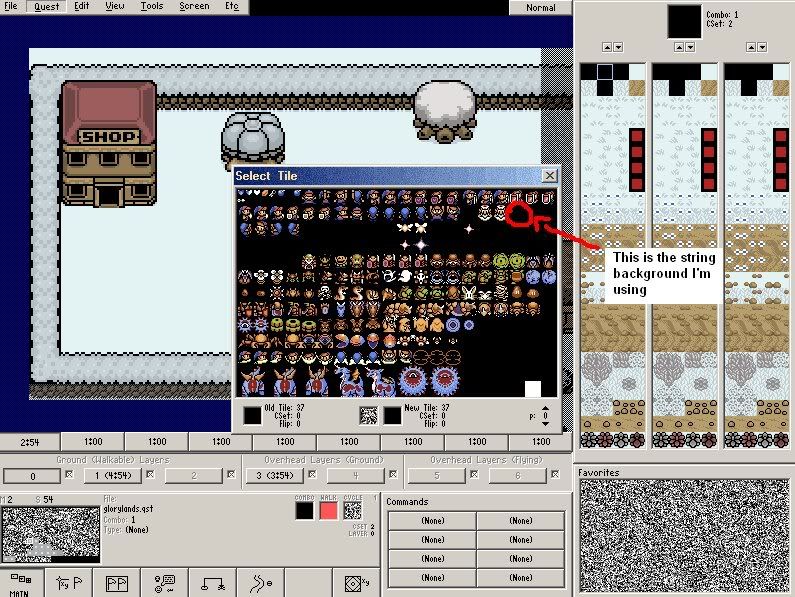
The above pic contains me showing you with a red border, red arrow and text which tile I'm using for a string. Ignoring the red brush border, the tile has the exact same tile to the bottom, right and the bottom right.
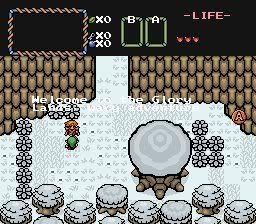
This one shows the exact same string (not shown in first pic) in the game, with pkmnfrk's NPC script (unmodified). As you can see, no black background, thus barely readable.
Take an unused tile (such as the one you picked), and edit it. Fill it with a black other than the first black (with the white X).
Bad:

Good:

Ohh... oh. Now I get it. See, I had never actually edited a tile before. Thanks, pkmnfrk and everybody else! You were a big help!
I can only assume you're well on your way to being a pro! Good luck!