I was just wondering how to make people talk when you walk up to them. How do you do this?
How do I make people talk?
This requires using two separate screens. For explanatory purposes, I will refer to them as Screens A and B. Screen A is the screen that has the person Link walks up two to generate the messtring, and Screen B will show the message string itself.
1. Put a "person" tile on Screen A.
2. Place a tile next to the person with the combo type "pit."
3. Make an exact copy of this screen, and put it on any Dmap you want. This copy is Screen B. The two screens should be EXACT copies tile by tile.
4. On Screen B, assign a message string or strings for the person to say, and use "fire" as the guy. Also, Screen B must be on a Dmap with a level number greater than 0.
5. If you want, use a message box to display the message strings (similar to what we see in traditional RPGs), and use black squares for the inside of it. This is not necessary, but it can make the text easier to read. Here is a ASCII text layout of a screen in ZC:
****************
****************
*1************2*
****************
*3************4*
****************
****************
****************
****************
****************
****************
The numbers 1-4 in the diagram represent where you would place the corners of the text border if you wish to use one.
5. Place a pit tile next to the person on Screen B.
6. Set the tile warp between the screens just as you would for a cave or dungeon warp. Use insta-warp as the warp type, so that there are no special warp effects other than just the appearance and disappearance of the message string.
Also, you can download a quest on the Database called "A Link to the Darkness" and open it in ZQuest (no password needed). In that quest, go to screens 64 and 1F on the overworld. This quest uses signpost messages, but the procedure is basically is the same as for having people talk to you. Also, on screen 1F, you can see an example of one of those text boxes if you choose to use it.
I made this a while ago. It should help you.
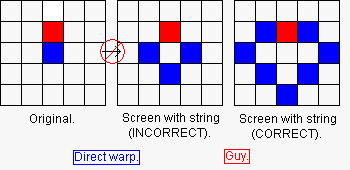
This is entirely in my opinion. The middle diagram shows the "wrong" way to do it, the right one shows the "correct" way to do it. In the "wrong," it is possible to view the string more than once involuntarily. When you walk away, you could trigger the direct warp again and view the string again. In the "correct" way, you cannot view the string twice involuntarily.
Oh, and a pit combo is a direct warp combo in 2.10/2.11.
EDIT: Added the word "warp" between "direct" and "combo"... oops. 😉
I got the warp to work, but the text is not working! What am I doing wrong?
Make sure there is a guy!
The D-Map level # should be above 0!(Use 10 or above unless it is a dungeon)
Oops--Thanks Pineconn for that point. As I just found out, "pit" is not listed in the combo types in 2.10, so use "direct warp" instead as the combo type.
The DMap level has to be above zero because usually message strings are not supported in overworlds. Just remember that levels 1-8 are reserved for dungeons where you find the Triforce pieces.
My bad - I said it was a direct combo, not a direct warp, as it should be. We're all making mistakes. 😊
I think I've tried everything I could, But the person still doesn't talk.
I think I might want to find that "A link to the darkness" thing, But I can't find it on the database. Can somebody help me find it?
Oh yeah, before I forget, I'm using 2.11.
Can you give an example of your quest so we can see what exactly you are doing wrong?
As far as that "A Link to the Darkness" quest goes, search by Quests Beginning With "L" rather than "A."
Did you check to see that you did everything we tried to explain? We might not have explained it quite right as this can be a difficult thing to do. But it is possible.
there is no link to the darkness anymore... the author of said quests has had them removed from the downloads area.
I was not aware of that, and I just noticed that it was no longer on the QBD. Just a reminder that quest authors can do whatever they want regarding whether they want their games available to the ZC-playing public.
Zyoss2000, did you check whether the the screen with the message string:
a. Is on a DMap with a level number greater than 0.
b. Has the message string set
c. Has a "guy" selected (I prefer "fire"😉
I found out why the people didn't talk. I forgot to set the level number higher than zero.
That's a very common mistake, especially if you're placing people in an overworld which uses a level number of zero.
Help! I will be as specific as I can. I set the warp and it works(so let's skip that). I put a COMBO that looks like a guy on screen A(layer2). I set the combo on layer 2 of screen B as well. I set the guy to fire like you said. but fire guy shows up(of course). I change rule to "no guy fires". fire on side doesn't show but fire GUY does. I try taking guy tiles off and switching guy to abei on both screens. He disappears then reappears when the warp happens. How do I make it so when I warp, the guy doesn't flicker?😕
I had the same problem. go to the ZC Quest editor help and look for this topic: Turnig or disabling abei smoke effect animations. look for pineconn's response that'll tell you how to do it