Not a developer or quest creator here, just a player. Hope it's okay to post this. I downloaded 2.10w, played as a new character, won Quest 1, eagerly continued, and major disappointment. My character opens in the uppermost left corner of the game map, stuck in the mountains.
Is this a bug or something I can correct? I read instructions for playing Quest 2 that said define your character as Zelda, but the game will not let me enter any character name beginning with Z.
Grateful for any help -
That's a bug in 2.10 that I believe is fixed in the latest beta. As for the Z issue, you have the Z key assigned to your B button. Change the key assignment to something else (like the Control key) until after you get your name entered, then you can change it back.
Big duh on my part - I should have thought of the key settings. Thanks!
As for the version, I did not see 2.11 in the list of downloads. Can you point me to it, or is it not available for non-developers like me?
I appreciate all your help!
It's in the beta forums, just below this group of forums.
Ah. DN beat me to the post, but anyway if you don't understand what he meant......
You can find 2.11 here. Grab the 2.11 full first, then grab the 2.11b10b and cut and paste it to the folder you placed 2.11 in.
The 2.11b10b is the most recent. And yes, DN, the continue to Quest 2 bug was fixed with 2.11.
Found 'em, downloaded, unzipped, pasted. Thank you!
Opens in little bitty window - no Installation Wizard for this to give me different open options?
(Sorry to be so dumb, this info is probably somewhere in a forum and I just didn't understand it.)
PS Forgot to add that this occurs in all resolutions
If you don't want it to run in the small window, create a shortcut to the program. Right-click the shortcut and go to properties. In the shortcut tab, find the target text box. Make sure the entire target location is in quotation marks first. Then, type in " -fullscreen" after the entire thing.
If my instructions are confusing, look at this:
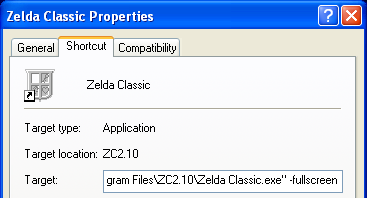
Reversely, if you want it to open in the small window, use " -windowed" instead of fullscreen. For a full list of command line options, go here.
😊
Got everything going great on my desktop - my widescreen laptop just won't cope, however. 😞 Would have been great to have (I travel a lot).
Oh well 1 outta 2 ain't bad.
Thanks very much for all the help!